
Effective AI Prompts: Complete Guide to Prompt Engineering

You open ChatGPT, type “write a blog post about productivity,” hit enter, and get… generic garbage. Sound familiar?
The problem isn’t the AI. It’s your prompt.
Most people treat AI like a search engine: toss in a few words and hope for the best. But AI tools like ChatGPT, Claude, and Gemini aren’t search engines. They’re conversational partners capable of remarkable output, but only when you know how to communicate with them effectively.
The difference between mediocre AI results and exceptional ones isn’t access to better models or secret hacks. It’s prompt engineering: the skill of crafting instructions that consistently produce exactly what you need.
Since the AI revolution, I’ve spent hundreds of hours testing AI prompts across every major platform. I’ve watched the same person get completely different results from ChatGPT just by changing how they phrase their request. I’ve seen businesses transform their content production, customer service, and data analysis simply by learning to prompt effectively.
This guide shows you exactly how to write AI prompts that work. You’ll learn the fundamental principles that apply across all AI platforms, proven frameworks for different use cases, common mistakes that waste your time and produce garbage output, and advanced techniques that separate casual users from power users.
By the end, you’ll write prompts that generate publication-ready content on the first try, handle complex tasks with minimal revision, and save hours of back-and-forth refinement.
Let’s master prompt engineering together.
Understanding How AI Actually Interprets Prompts
Before writing better prompts, you need to understand what AI actually does with your input.
AI language models don’t think or reason like humans. They predict what words should come next based on patterns learned from massive datasets. When you write a prompt, the AI analyzes your input and generates a response by predicting the most likely continuation based on its training.
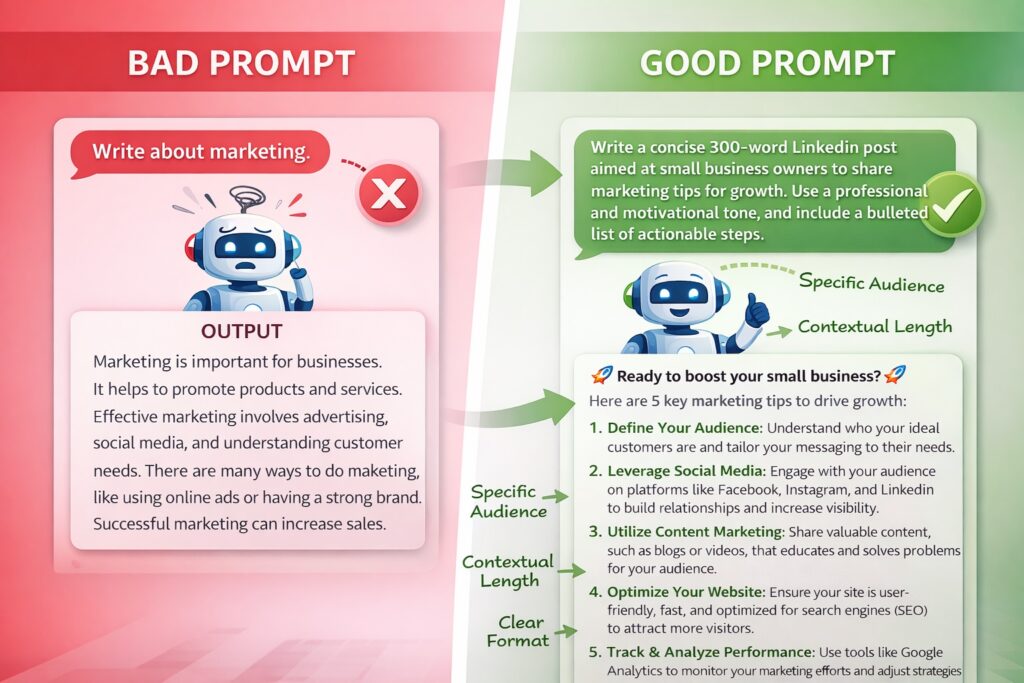
This matters because vague prompts force AI to fill gaps with assumptions. Ask “write about marketing” and the AI guesses what kind of marketing, what audience, what length, what tone. Those guesses rarely match what you actually wanted.
The magic happens when you provide enough detail that the AI doesn’t need to guess. Specificity eliminates ambiguity. Context guides direction. Structure organizes output. Constraints prevent drift.
Think of prompting like programming with words. Your prompt is code, and precision determines whether the program runs correctly. Unlike traditional programming, where typos break everything, AI handles natural language flexibly, but clarity still dramatically improves results.
Modern AI models like GPT-4, Claude, and Gemini understand conversational language remarkably well. You can write prompts as if talking to a knowledgeable colleague rather than memorizing rigid syntax. This flexibility is powerful but requires discipline. Conversational doesn’t mean casual or imprecise.
The AI maintains context within a conversation but resets with each new chat. It doesn’t remember previous sessions or know anything about your business unless you explicitly provide that information in your current prompt. Everything relevant must be included or referenced directly.
AI also has no inherent understanding of your goals, audience, or constraints. It generates based on patterns, not purpose. Your prompt defines purpose. Bad prompts produce output that technically responds to your request but misses your actual need. Good prompts align AI behavior with your intended outcome.
Understanding this context-prediction mechanism explains why certain prompting techniques work. We’ll explore those techniques now, building from fundamental principles to advanced strategies.
The Core Principles of Effective AI Prompts
Five fundamental principles separate effective prompts from ineffective ones. Master these, and you’ll write better prompts for any AI task.
Principle 1: Be Specific and Clear
Vague requests produce vague results. Specific instructions generate targeted output.
Bad prompt: “Write about productivity.”
Better: “Write a 500-word blog post explaining the Pomodoro Technique for remote workers who struggle with distractions.”
The difference is specificity. The better prompt defines length, audience, technique, and pain point. The AI knows exactly what to deliver.
Specificity applies to every aspect of your request. Define the topic precisely, specify the audience and their context, state the desired length or scope, clarify the purpose or outcome, and identify the format or structure.
Generic prompts force AI to make assumptions. Each assumption introduces drift from your actual needs. Remove ambiguity and watch the result quality improve dramatically.
Principle 2: Provide Context
AI doesn’t know your business, audience, or situation unless you explain. Context transforms generic output into relevant, customized content.
Without context: “Write a product description.”
With context: “Write a product description for our productivity app targeting freelance designers who need better time tracking. Our brand voice is friendly but professional, not corporate or salesy.”
Context includes your industry and market, target audience characteristics, brand voice and style preferences, relevant background information, and specific constraints or requirements.
The more context you provide, the less generic the output. Context makes AI responses feel custom-tailored rather than template-generated.
However, context should be relevant. Don’t dump your entire business history into every prompt. Include details that actually affect the desired output and nothing more.
Principle 3: Use Role Assignment
Telling AI what role to adopt dramatically improves output quality. Role assignment frames the AI’s perspective and expertise.
Generic: “Explain quantum computing.”
Role-assigned: “You are a computer science professor explaining quantum computing to undergraduate students with no physics background. Use clear analogies and avoid complex mathematics.”
Role assignment works because it activates relevant patterns in the AI’s training. When you say “act as a lawyer,” the AI draws from legal language patterns. “Act as a kindergarten teacher” produces entirely different language patterns.
Effective roles include professional personas (lawyer, marketer, engineer, analyst), audience perspectives (customer, student, executive, technical expert), writing styles (journalist, academic, storyteller, technical writer), and decision-making frameworks (strategist, critic, optimizer, innovator).
The role should match your task. For business analysis, assign analyst or strategist roles. For creative content, try a storyteller or a creative director. And for technical documentation, specify a technical writer or engineer.
Role assignment is optional but powerful. Use it when the perspective significantly affects output quality.
Principle 4: Specify Format and Structure
AI can generate output in countless formats, but you must specify which one you want. Format specification reduces editing time and ensures usability.
Without format: “Explain project management methodologies.”
With format: “Create a comparison table of Agile, Waterfall, and Scrum methodologies. Include columns for: definition, best use cases, pros, cons, and typical timeline. Use 2-3 sentences per cell.”
Format specifications include output type (list, table, essay, dialogue, code), length parameters (word count, bullet points, sections), organizational structure (headers, sections, sequence), and presentation style (formal, casual, technical, simplified).
Specifying a format prevents the AI from choosing a structure that doesn’t match your needs. If you need a quick reference table but end up with a 1,000-word essay, you’ve wasted time, even if the content is good.
Common useful formats include bullet-point lists for scannable information, tables for comparisons, step-by-step instructions for processes, Q&A format for FAQs, outline format for planning, and specific templates for consistent output.
The more precisely you define structure, the more immediately usable the output becomes.
Principle 5: Set Clear Constraints
Constraints prevent AI from going in directions you don’t want. They establish boundaries that keep output focused and relevant.
Without constraints: “Write marketing copy for our app.”
With constraints: “Write marketing copy for our time-tracking app. Target audience: freelancers. Length: 150 words maximum. Avoid jargon and corporate language. Don’t use the words ‘revolutionary,’ ‘game-changing,’ or ‘transform.’ Focus on practical benefits, not features.”
Effective constraints include what to avoid or exclude, tone and style boundaries, length limits (words, characters, sections), content restrictions (topics, angles, perspectives), and technical requirements (reading level, terminology, assumptions).
Constraints might feel limiting, but they actually improve creativity by providing direction. Unlimited possibilities often produce generic results. Specific boundaries force more thoughtful, targeted output.
Negative constraints (what not to do) work differently from positive instructions. AI handles positive instructions better, so when possible, state what you want rather than what you don’t want. Instead of “don’t be boring,” say “make it engaging and conversational.”
These five principles: specificity, context, role assignment, format specification, and constraints, form the foundation of effective prompting. Apply them consistently, and your AI outputs will improve immediately.
The Framework for Writing Any AI Prompt
Now that you understand principles, let’s apply them systematically. This framework works for any AI task across any platform.
The CROFT Framework: Context, Role, Objective, Format, Tone
Context: Provide relevant background information that affects the output. Who is the audience? What’s the situation? What specific circumstances apply?
Role: Assign the AI a perspective or expertise. What kind of expert should it act as? What viewpoint should it adopt?
Objective: State clearly what you want accomplished. What specific outcome do you need? What problem are you solving?
Format: Specify the structure and presentation. How should the output be organized? What format makes it most useful?
Tone: Define the voice and style. What emotional quality should the content have? How formal or casual?
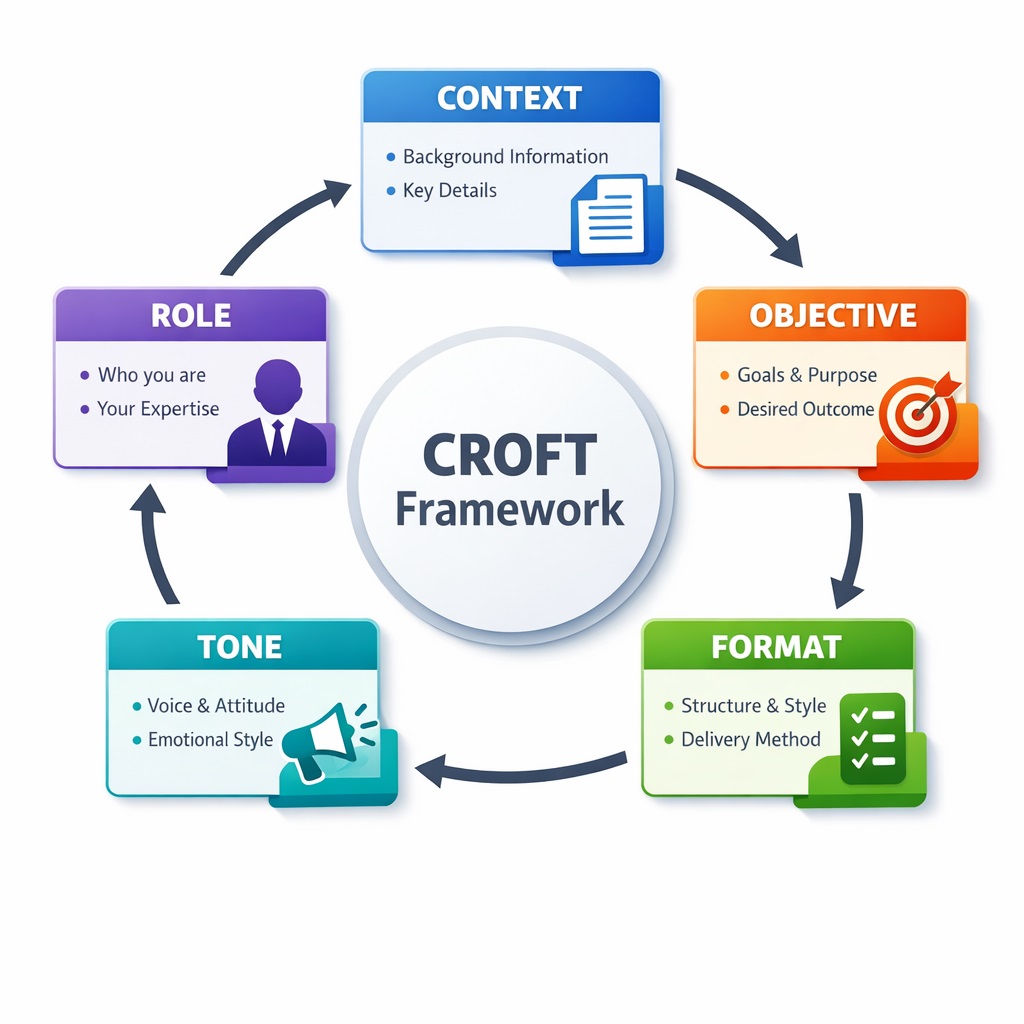
Not every prompt needs all five elements. Simple tasks might require only an objective and format. Complex tasks benefit from the complete framework.
Let’s see this in practice with progressive examples.
Basic prompt: “Write an email about our team meeting.”
CROFT-enhanced: “Context: Our product team had a planning meeting yesterday to discuss Q2 roadmap priorities. Role: You are the product manager writing to engineering leads. Objective: Summarize key decisions and action items from the meeting. Format: Brief email with bullet points for decisions and a numbered list of action items with owners. Tone: Professional but collaborative, not formal.”
The enhanced prompt produces immediately usable output because it eliminates guesswork. The AI knows exactly what to create.
Here’s another example for content creation.
Basic: “Write about email marketing.”
CROFT-enhanced: “Context: Small business owners who have a customer email list but have never run email campaigns. Role: Email marketing consultant with 10 years of experience. Objective: Explain how to create an effective email sequence for abandoned cart recovery. Format: Step-by-step guide with 5 concrete steps, each 2-3 sentences with a practical example. Tone: Encouraging and practical, not technical or overwhelming.”
The framework scales beautifully. For quick tasks, use fewer elements. For important projects, use all five.
Prompt template you can adapt:
“Context: [Who is the audience? What’s the situation?]
Role: You are [specific role or expertise].
Objective: [What specific outcome do you need?]
Format: [How should the output be structured?]
Tone: [What voice and style?].”
This template ensures you consider all relevant factors before submitting your prompt. Fill it in thoughtfully, and you’ll rarely get unusable outputs.
The CROFT framework becomes second nature with practice. Eventually, you’ll incorporate these elements naturally without consciously thinking through each component.
Prompt Engineering Techniques for Different Use Cases
Different tasks require different prompting approaches. Let’s explore proven techniques for common business use cases.
Content Writing and Copywriting
For content creation, the challenge is generating material that sounds human, not AI-generated. Effective prompts produce content requiring minimal editing.
Key techniques: Provide writing samples or style references, specify audience pain points explicitly, define brand voice with specific examples, include keywords or themes to incorporate, and set concrete length parameters.
Example prompt: “Write a 600-word blog post introduction about time management for overwhelmed small business owners. Target audience: solopreneurs running service businesses who wear too many hats. Pain point: constant context-switching between client work and business operations. Tone: empathetic and encouraging, like a friend giving practical advice. Include a relatable story or scenario in the first paragraph. Avoid clichés like ‘time is money’ or ‘work smarter, not harder.'”
This prompt succeeds because it defines audience, pain point, tone, structure, and constraints. The output will feel targeted rather than generic.
For ongoing content needs, consider creating custom instructions or personas you reuse. Our AI prompt engineering guide for marketing provides 50+ ready-to-use templates for common content scenarios.
Data Analysis and Insights
AI excels at analyzing data when requests are properly structured. The key is clarity about what insights matter.
Key techniques: Provide the actual data (paste or describe), state the specific question you need answered, define what constitutes a meaningful insight, specify how to present findings, and set parameters for depth of analysis.
Example prompt: “Analyze this customer survey data: [paste data]. Find patterns in why customers cite ‘ease of use’ as their top-rated feature while also reporting confusion during onboarding. Identify the apparent contradiction and suggest 2-3 hypotheses explaining it. Present findings as: 1) Summary of the contradiction in 2 sentences, 2) Three possible explanations with supporting data points, 3) One recommendation for further investigation.”
Clear analytical prompts transform raw data into actionable insights. Vague requests like “analyze this data” produce surface-level observations that don’t advance understanding.
Brainstorming and Ideation
AI makes an excellent brainstorming partner when prompted to explore broadly before narrowing down.
Key techniques: Ask for quantity over quality initially (10-20 ideas), provide constraints that inspire creativity, request different categories or approaches, build on initial outputs with follow-up prompts, and ask AI to evaluate and rank its own suggestions.
Example prompt: “Generate 15 unique angle ideas for blog posts about employee retention targeting HR managers at mid-size companies (100-500 employees). Include a mix of: data-driven angles, personal story angles, how-to guides, and contrarian perspectives. For each idea, provide the article title and a one-sentence description of the unique value or insight.”
Effective brainstorming prompts produce variety. Don’t ask for “the best idea”: ask for many ideas, then evaluate them yourself or ask AI to help evaluate based on specific criteria.
Problem-Solving and Strategy
Strategic prompts benefit from step-by-step reasoning. Ask AI to think through problems systematically.
Key techniques: Request chain-of-thought reasoning (show your work), ask for multiple perspectives or approaches, include relevant constraints and considerations, specify decision criteria or evaluation framework, and request pros/cons analysis before recommendations.
Example prompt: “Think step-by-step about whether we should switch from monthly to annual billing for our SaaS product. Context: Current MRR is $50K with 200 customers averaging $250/month. 40% churn annually. Decision criteria: impact on cash flow, effect on churn, customer reception, and competitive positioning. First, outline the key considerations for each criterion. Then, estimate the financial impact of both options. Finally, provide a recommendation with 2-3 key reasons supporting your conclusion.”
Strategic prompts that request structured thinking produce more rigorous analysis than those asking for immediate recommendations.
Customer Service and Communication
For customer-facing communication, accuracy and tone are critical. Prompts should prioritize clarity and empathy.
Key techniques: Provide the customer’s actual message or situation, specify company policies or limitations, define acceptable tone (helpful, apologetic, solution-oriented), include template examples if you have them, and set constraints on promises or commitments.
Example prompt: “Customer email: ‘My shipment was supposed to arrive Thursday, but it’s now Saturday and tracking hasn’t updated since Wednesday. This is the second time this happened with your company.’ Write a response that: 1) Apologizes genuinely without making excuses, 2) Explains we’ve contacted the carrier for an update, 3) Offers either a refund or expedited replacement at their choice, and 4) Includes a 20% discount code for the inconvenience. Tone: apologetic and solution-focused, not corporate or scripted. Keep under 150 words.”
Communication prompts succeed when they balance empathy with specific action steps. Vague prompts produce form-letter responses that frustrate customers.
Code and Technical Documentation
Technical prompts require precision about languages, frameworks, and requirements.
Key techniques: Specify programming language and version, describe the input/output requirements clearly, mention relevant libraries or frameworks, include error handling requirements, and request comments or documentation as needed.
Example prompt: “Write a Python function that takes a CSV file of customer data and returns a dictionary of customers grouped by city, sorted by purchase total descending within each city. Include error handling for missing CSV headers and invalid data types. Add docstring explaining parameters, return value, and potential exceptions. Use pandas for CSV reading. Format code with clear variable names and inline comments for complex logic.”
Technical prompts eliminate ambiguity about requirements. The more specific, the less back-and-forth debugging later.
Each use case benefits from tailored prompting techniques, but the fundamental principles remain constant: be specific, provide context, define format, and set constraints.
Advanced Prompting Techniques
Once you’ve mastered basic prompting, these advanced techniques unlock even more powerful results.
Chain-of-Thought Prompting
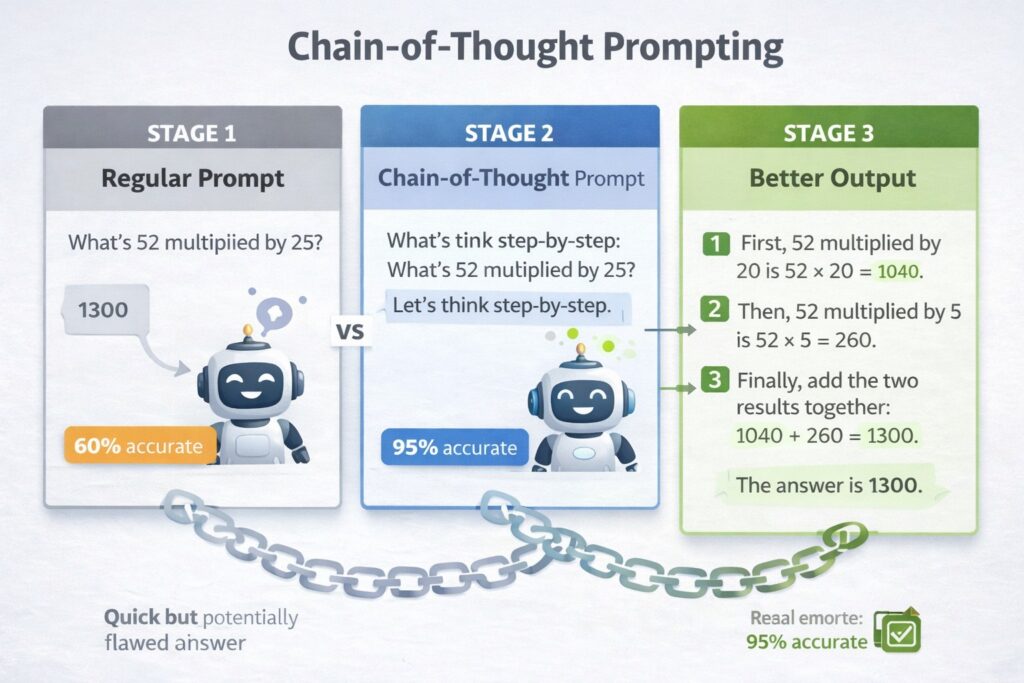
Chain-of-thought prompting asks AI to show its reasoning process before reaching conclusions. This technique improves accuracy for complex problems.
Basic approach: Add “Let’s think through this step-by-step” or “Show your reasoning before the final answer.”
Example: “Calculate the ROI of our content marketing program. Budget: $5,000/month. Results: 2,000 monthly visitors, 50 leads, 5 customers, average customer value $2,000. Let’s think through this step-by-step: first calculate costs, then value generated, then ROI percentage. Show your work for each step.”
Chain-of-thought prompting prevents AI from jumping to conclusions without considering all factors. The reasoning process often reveals logical flaws you can correct before accepting the final answer.
Few-Shot Prompting
Few-shot prompting provides examples of desired output to guide AI toward your preferred style and format.
Example: “Write social media captions for our coffee shop. Here are two examples in our style:
- ‘Monday survival tip: double espresso + our new cinnamon roll = you’ve got this.’
- ‘Plot twist: decaf doesn’t have to be boring. Try our new Swiss Water Process beans: all flavor, zero jitters.’
- Now write 3 more captions promoting our new breakfast sandwich.”
Few-shot prompting teaches AI by demonstration rather than description. When you can show what you want more easily than explaining it, provide examples. For a detailed overview, you may visit our article Chain-of-thought prompting guide.
Iterative Refinement
Rather than crafting the perfect prompt initially, use conversation to refine outputs progressively.
First prompt: “Write a product description for our project management software.”
Refinement prompts:
- “Make it more concise, under 100 words.”
- “Remove the feature list and focus on benefits for remote teams.”
- “Rewrite the opening sentence to be more attention-grabbing.”
Iterative refinement works well when you recognize what’s wrong more easily than you can specify what’s right upfront. Each refinement narrows closer to your goal.
Perspective Shifting
Ask AI to approach the same problem from multiple viewpoints, then synthesize insights.
Example: “Analyze our pricing strategy from three perspectives: 1) As a value-focused customer, 2) As a competitor, 3) As our CFO. Identify what each perspective reveals that others don’t.”
Perspective shifting prevents tunnel vision and uncovers insights a single viewpoint misses.
Template Creation
For recurring tasks, create reusable prompt templates with variables you fill in.
Template: “Write [content type] for [audience] about [topic]. Length: [X words]. Tone: [specify]. Include: [required elements]. Avoid: [constraints].”
Filled: “Write a LinkedIn post for startup founders about fundraising mistakes. Length: 200 words. Tone: honest and helpful, not preachy. Include: 3 specific mistakes with brief examples. Avoid: jargon and obvious advice like ‘have a good pitch.'”
Templates ensure consistency while allowing customization for each use.
Constraint-Based Creativity
Adding specific constraints often produces more creative results than unlimited freedom.
Example: “Write a product tagline for our meditation app. Constraints: exactly 5 words, must include the word ‘breath,’ cannot use the words ‘calm,’ ‘peace,’ ‘zen,’ or ‘relax.'”
Constraints force AI to explore less obvious solutions, often yielding more distinctive results.
Advanced techniques build on fundamentals. Master basic prompting first, then experiment with these approaches for specific scenarios requiring extra sophistication.
Common Prompting Mistakes and How to Avoid Them
Even experienced users make these mistakes. Recognizing them helps you avoid wasted time and frustration.
Mistake 1: Being Too Vague
Problem: “Help me with marketing.”
Fix: Specify what aspect of marketing, for what business, with what goal.
Vague prompts force AI to guess your actual need. Every guess introduces drift from your intended outcome.
Mistake 2: Forgetting to Specify Format
Problem: You need a quick reference table, but the AI writes a 500-word essay.
Fix: Always state format explicitly: table, list, outline, step-by-step, etc.
Format specification seems minor, but it dramatically affects usability. A wrong format means manual reformatting work.
Mistake 3: Providing Irrelevant Context
Problem: Including your entire company history when you just need a product description.
Fix: Provide only the context that affects the specific output needed.
Too much context clutters the prompt and can confuse the AI about what actually matters. Be relevant, not comprehensive.
Mistake 4: Accepting First Output Without Iteration
Problem: Getting a mediocre result and moving on instead of refining.
Fix: Use follow-up prompts to improve specific aspects: “Make this more concise,” “Add specific examples,” “Rewrite in a more conversational tone.”
AI outputs improve dramatically with iteration. First drafts establish direction; refinements polish quality.
Mistake 5: Not Checking for Accuracy
Problem: Assuming AI-generated facts, statistics, or citations are correct without verification.
Fix: Always verify factual claims, especially for published content or important decisions.
AI occasionally generates plausible-sounding but incorrect information. This “hallucination” problem requires human fact-checking, particularly for claims requiring accuracy.
Mistake 6: Treating All AI Platforms Identically
Problem: Using the exact same prompt across ChatGPT, Claude, and Gemini, assuming identical results.
Fix: Understand platform differences and adjust prompts accordingly.
While core principles apply universally, each platform has strengths. ChatGPT excels at creative content, Claude handles long documents better, and Gemini integrates with Google services. Tailor your approach to platform capabilities. See our detailed comparison of major AI platforms.
Mistake 7: Overcomplicating Simple Tasks
Problem: Writing paragraph-long prompts for straightforward requests.
Fix: Match prompt complexity to task complexity. Simple tasks need simple prompts.
Overthinking wastes time. “Summarize this in 3 bullet points” suffices: no need to add role assignment, context, and constraints for a simple summary.
Mistake 8: Ignoring Tone and Voice
Problem: Getting technically correct output that feels wrong for your brand or audience.
Fix: Explicitly specify tone, voice, and style preferences.
Technical accuracy without appropriate tone creates content that needs complete rewriting. Address tone upfront rather than fixing it later.
Mistake 9: Not Using Variables for Repetitive Tasks
Problem: Rewriting entire prompts for similar tasks instead of creating templates.
Fix: Build reusable templates with bracketed variables you swap out.
If you’re writing similar prompts repeatedly, you’re working inefficiently. Templates save time and ensure consistency.
Mistake 10: Abandoning Failed Prompts Instead of Learning
Problem: The prompt doesn’t work, you give up, and try something completely different.
Fix: Analyze why it failed and adjust systematically.
Failed prompts teach valuable lessons. Was the objective unclear? Did you provide enough context? Was the format unspecified? Systematic debugging improves your prompting skills faster than starting over repeatedly.
Avoiding these mistakes accelerates your learning curve and produces better results faster.
Tools and Resources for Better Prompting
The right tools enhance your prompting effectiveness and efficiency.
AI Platforms Worth Knowing
ChatGPT remains the most versatile option for general business use. The Plus subscription ($20/month) provides access to GPT-4o, faster responses, and Custom GPTs for specialized tasks. Explore our library of 100+ ChatGPT prompts for common professional use cases.
Claude excels at handling long documents and nuanced analysis. Claude Projects maintains context across conversations, perfect for ongoing research or complex projects. The Pro plan ($20/month) provides extended usage.
Google Gemini offers the best value for Google Workspace users with native integration across Gmail, Docs, and Sheets. Gemini Advanced ($19.99/month) includes the most capable model and 2TB storage.
Microsoft Copilot integrates seamlessly with Microsoft 365, making it ideal for organizations already on that platform. Copilot Pro ($20/month) works across Office apps.
Platform choice matters less than prompting skill. Master fundamentals on one platform, then adapt to others as needed.
Prompt Libraries and Templates
Several resources compile tested prompts for common scenarios:
Awesome ChatGPT Prompts (GitHub repository) provides hundreds of role-based prompts for different scenarios. While focused on ChatGPT, most work across platforms with minor adaptation.
PromptBase operates as a marketplace where people buy and sell effective prompts. Useful for seeing what prompts others find valuable enough to purchase.
FlowGPT offers a community-driven prompt-sharing platform. Browse by category to find approaches for specific use cases.
These resources provide starting points, but your best prompts will be custom-built for your specific needs.
Prompt Management Tools
As you develop effective prompts, you need systems to organize and reuse them.
Text Expander and Alfred (Mac) or PhraseExpress (Windows) let you save prompts as shortcuts. Type a trigger phrase, and your full prompt expands automatically.
Notion or Airtable work well for building prompt libraries organized by category, use case, and platform. Tag prompts with success rate and notes on when to use each.
Custom GPTs (ChatGPT Plus) let you create specialized AI assistants with built-in instructions. Create GPTs for recurring tasks like brand-voice content, weekly reports, or customer communications.
The key isn’t which tool you use, but that you systematically capture prompts that work and make them easily accessible for reuse.
Browser Extensions
Several browser extensions enhance AI tool usage:
AIPRM adds prompt templates directly to ChatGPT’s interface, organized by category with community ratings.
Merlin provides AI assistance across websites, letting you prompt AI from any page without switching to a separate tab.
ChatGPT Writer helps draft emails and messages with AI assistance directly in your email client.
Extensions reduce friction between identifying a need and prompting AI to address it.
Building your prompting toolkit takes time, but the productivity gains compound. Invest in tools that match your workflow and use patterns.
The Future of AI Prompting
Understanding where prompting is heading helps you prepare for what’s coming.
Natural language understanding continues to improve. Future AI models will require less explicit instruction, inferring more context from shorter prompts. However, this doesn’t eliminate the need for good prompting: it raises the ceiling on what’s possible.
Multimodal prompting is expanding. Models increasingly accept images, audio, and video as input alongside text. You’ll prompt by showing examples visually rather than describing them verbally. Imagine uploading a competitor’s website and asking, “Create a similar design for our product,” with automatic understanding of the visual style.
Agentic AI reduces prompting frequency. Rather than prompting for individual tasks, you’ll set goals and constraints while AI agents autonomously complete multi-step workflows. Our guide to AI agents for business explores this evolution in depth.
Personalization will improve. AI that learns your preferences, writing style, and common requests will require less explicit instruction over time. Custom instructions and persistent memory features move this direction.
Prompt engineering becomes collaborative. Teams will share prompt libraries, establishing organizational standards for AI interaction. Prompt templates become company assets like style guides.
Quality thresholds rise. As AI becomes ubiquitous, mediocre AI-generated content floods the market. Effective prompting that produces genuinely valuable output becomes a differentiating skill.
The fundamental prompting principles: clarity, context, specificity, and structure, remain relevant regardless of technological advancement. Master them now, and you’ll adapt easily as capabilities evolve.
Your Action Plan for Prompt Mastery
You now understand how to write effective AI prompts. Here’s how to actually improve your skill through practice.
This Week: Choose one AI platform (ChatGPT, Claude, or Gemini) as your primary tool. Commit to using it daily for at least one task. Each time you prompt, ask yourself: “Did I provide enough context? Did I specify the format? Were my instructions clear?” Iterate on prompts that don’t work rather than accepting poor results.
Create a simple document or note where you save prompts that produce excellent results. Note what worked and why. This becomes your personal prompt library.
This Month: Experiment with the CROFT framework (Context, Role, Objective, Format, Tone) for important tasks. Compare results from CROFT-structured prompts versus your usual prompting style. The improvement will be obvious.
Try advanced techniques like chain-of-thought prompting, few-shot examples, and iterative refinement. Not every technique suits every task, but testing them builds your prompting toolkit.
Build templates for your recurring tasks: weekly reports, content creation, customer communications, and data analysis. Templates save time and ensure consistency.
This Quarter: Master one AI platform thoroughly before branching to others. Depth beats breadth initially. Once you’re proficient with one platform, adapting to others becomes straightforward because the principles transfer.
Analyze your prompting patterns. Which types of tasks still produce unsatisfying results? Focus on improvement there rather than areas you’ve already mastered.
Consider how AI integration fits your workflow. Rather than treating AI as a separate tool you visit occasionally, integrate it into daily processes. The more naturally you incorporate AI, the more value you extract.
Don’t wait for perfection. Start with basic prompts and improve through iteration. Every prompt teaches something, even failed ones. The skill develops through consistent practice more than studying theory.
Continue learning: Prompting evolves as AI capabilities advance. Stay current with new techniques and platform features. Our comprehensive AI tools guide explores emerging capabilities and how to leverage them effectively.
The gap between people who get mediocre results from AI and those who generate exceptional output isn’t access or talent. It’s a prompting skill. That skill is learnable, trainable, and improves with deliberate practice.
Your AI outputs are only as good as your prompts. Write better prompts, get better results, and unlock capabilities that seemed impossible months ago.
Start today. Open your AI tool of choice and apply one principle from this guide to your very next prompt. Notice the difference, build from there, and watch your AI effectiveness transform. The future belongs to those who can direct AI effectively. Master prompting, and you master the future of knowledge work.
FAQ’s (Frequently Asked Questions About AI Prompting)
A: An effective AI prompt is specific, provides relevant context, defines the desired format, sets clear constraints, and specifies tone or style. The five core elements that make prompts work are: specificity about what you need (not “write about marketing” but “write a 500-word blog post about email marketing for small business owners”), context about your situation and audience, format specification (list, table, essay, step-by-step guide), clear constraints on what to include or avoid, and tone definition (professional, casual, friendly, technical). Effective prompts eliminate ambiguity so the AI doesn’t have to guess your intentions. The difference between getting generic output versus exactly what you need comes down to how well you communicate these five elements. Most people fail at AI prompting because they treat it like search engines with vague keywords instead of providing clear instructions like you would to a knowledgeable colleague.
A: AI prompt length should match task complexity: simple tasks need 1-2 sentences, while complex projects may require several paragraphs. For basic requests like summarization or simple questions, 10-30 words suffice (e.g., “Summarize this article in 3 bullet points”). For content creation, 50-150 words typically work well, including topic, audience, length, tone, and format. And for complex analysis or strategy, 150-300 words may be necessary to provide adequate context, constraints, and structure. The key is to include all the information the AI needs to produce your desired output without unnecessary details. Longer isn’t automatically better: focused and relevant beats comprehensive but cluttered. A good rule: if you can remove a sentence without affecting output quality, it was probably unnecessary. Test your prompts and iteratively refine to find the optimal length for your specific use cases. Most people err on the side of too vague rather than too long.
A: The CROFT framework is a systematic approach to writing effective AI prompts using five key elements: Context, Role, Objective, Format, and Tone. Context provides relevant background information that affects the output (who is the audience, what’s the situation, what circumstances apply). Role assigns the AI a specific perspective or expertise (acts as a marketing strategist, technical writer, customer service agent). An objective states clearly what you want accomplished (the specific outcome or problem you’re solving). Format specifies how the output should be structured (bullet points, table, essay, step-by-step guide). Tone defines the voice and style (professional, casual, empathetic, technical). Not every prompt needs all five elements: simple tasks might only need objective and format. Complex tasks benefit from the complete framework. For example, a CROFT-enhanced prompt for a business email might include: Context (team meeting happened yesterday), Role (product manager writing to engineers), Objective (summarize decisions and action items), Format (brief email with bullet points), Tone (professional but collaborative). This framework ensures you consider all factors that affect output quality.
A: To write ChatGPT prompts that deliver better results, be specific about what you want, provide relevant context about your situation and audience, specify the exact format you need (list, table, paragraph, code), define tone and style preferences clearly, set constraints on what to avoid, and use iterative refinement with follow-up prompts. Start with a clear objective: instead of “write a blog post,” specify “write a 600-word blog post introduction about time management for overwhelmed solopreneurs.” Add context about your audience’s pain points and desires. Tell ChatGPT what role to adopt: “You are a productivity coach with 10 years of experience.” Specify format: “Include a relatable opening story, three key points in bullet format, and end with a question.” Define tone: “conversational and encouraging, not academic or corporate.” If the first output isn’t perfect, refine it: “Make this more concise,” “Add specific examples,” “Rewrite the opening to be more attention-grabbing.” ChatGPT improves with each refinement cycle. The key is treating it like a conversation with a talented colleague who needs clear direction rather than a search engine you query with keywords.
A: The most common AI prompting mistakes include being too vague (asking “help me with marketing” instead of specifying what aspect and goal), forgetting to specify output format (getting an essay when you needed a table), providing irrelevant context that clutters the prompt, accepting the first output without iterating to improve it, not fact-checking AI responses for accuracy (AI can generate plausible but incorrect information), treating all AI platforms identically when they have different strengths, overcomplicating simple tasks with unnecessarily long prompts, ignoring tone and voice specifications (getting technically correct but stylistically wrong output), not building reusable templates for recurring tasks, and giving up on failed prompts instead of systematically debugging them. The biggest mistake is treating AI like a search engine with keyword queries rather than a conversational tool requiring clear instructions. Most people also fail to iterate: they accept mediocre first drafts instead of using follow-up prompts to refine specific aspects. Another critical error is assuming AI-generated facts are accurate without verification, particularly for statistics, citations, or technical claims. Avoiding these mistakes requires shifting from a “query mindset” to an “instruction mindset” where you provide clear, specific directions as you would to a human assistant.
A: Improve your AI prompt writing skills through deliberate practice, systematic analysis of what works, and building a personal prompt library. Start by using AI daily for at least one task, consciously applying core principles (specificity, context, format, constraints). After each prompt, ask yourself: Did I provide enough context? Was my objective clear? Did I specify format? Could my instructions be more specific? Save prompts that produce excellent results in a document or note-taking app, annotating why they worked. Create templates for recurring tasks like content creation, analysis, or customer communications. Experiment with advanced techniques like chain-of-thought prompting (asking AI to show reasoning), few-shot examples (providing samples of desired output), and role assignment (telling AI what expert perspective to adopt). Compare results from basic prompts versus those using frameworks like CROFT (Context, Role, Objective, Format, Tone). Study prompt libraries and examples from experienced users, but adapt them to your specific needs rather than copying blindly. Most importantly, iterate on prompts that don’t work rather than abandoning them: debugging failed prompts teaches more than studying successful ones. The skill develops through consistent practice more than theoretical study, so commit to writing at least 5-10 prompts daily for a month.
A: Chain-of-thought prompting is an advanced technique where you ask AI to show its reasoning process step-by-step before reaching conclusions, which improves accuracy for complex problems and analytical tasks. Instead of asking “Calculate the ROI of our marketing campaign,” you add “Let’s think through this step-by-step: first calculate total costs, then revenue generated, then ROI percentage, showing your work for each step.” This technique works by forcing the AI to break down complex problems into logical steps rather than jumping to conclusions. Use chain-of-thought prompting for mathematical calculations and financial analysis, strategic decisions requiring multiple considerations, problem-solving where the reasoning matters as much as the answer, debugging or troubleshooting complex issues, and analytical tasks where you want to verify the logic. It’s particularly valuable when you need to check the AI’s work or when accuracy is critical. The technique often reveals flawed reasoning you can correct before accepting the final answer. However, it’s overkill for simple tasks: you don’t need step-by-step reasoning to summarize an article or generate creative content. Reserve it for situations where understanding the thinking process adds value. The slight increase in output length is worth the improved accuracy and transparency for complex analytical work.
A: Write effective AI content creation prompts by specifying the audience and their pain points, defining the exact length and structure, establishing a clear tone and voice, providing context about your brand or topic, setting constraints on what to avoid, and including examples when possible. Start by identifying your target audience precisely: not just “business owners” but “solopreneurs running service businesses who struggle with time management.” State their specific pain point or desire. Define exact parameters: “Write a 600-word blog post introduction” is better than “write a blog post.” Specify structure: “Include an opening story, three key points, and end with a question.” Establish tone explicitly: “conversational and empathetic, like advice from a friend, not corporate or salesy.” Provide relevant context: “Our brand helps freelancers be more productive without burnout.” Set negative constraints: “Don’t use clichés like ‘time is money’ or ‘work smarter, not harder.'” If you have a specific style in mind, provide 1-2 example paragraphs demonstrating your preferred voice. For ongoing content needs, create custom instructions or personas you can reuse. Remember that content prompts benefit from iteration: get a first draft, then refine specific aspects: “Make the opening more attention-grabbing,” “Add concrete examples,” “Shorten to 500 words while keeping all key points.”
A: While core prompting principles apply across all AI platforms, you should tailor your approach to each platform’s specific strengths and optimize prompts accordingly. ChatGPT excels at creative content, brainstorming, and conversational tasks, so prompts emphasizing creativity and variety work best. Claude handles long-form content and complex analysis better, making it ideal for prompts involving extensive documents, nuanced reasoning, or multi-step analysis: you can provide more context (up to 200K tokens) than with other platforms. Google Gemini offers real-time web access and multimodal capabilities, so prompts can reference current events or include images alongside text. Microsoft Copilot integrates with Office apps, making prompts that reference specific documents or workflows in Word, Excel, or PowerPoint particularly effective. The fundamental structure remains similar: specify objective, provide context, define format, but emphasize features that match each platform’s capabilities. For example, with Claude, you might use Claude Projects to maintain context across conversations, while with ChatGPT, you’d create Custom GPTs for recurring tasks. That said, most well-written prompts work acceptably across platforms with minor adjustments. Start by mastering one platform thoroughly before worrying about cross-platform optimization. The skill of writing clear, specific, contextual prompts matters more than platform-specific tricks.
A: Few-shot prompting provides AI with 2-3 examples of your desired output style or format to guide it toward matching your preferences, which works better than describing what you want when you can show it. Instead of explaining your social media caption style, you show examples: “Write captions like these: 1) ‘Monday survival tip: double espresso + cinnamon roll = you’ve got this ☕’ 2) ‘Plot twist: decaf doesn’t have to be boring. Try our Swiss Water beans: flavor without jitters 🌊’ Now write 3 more promoting our breakfast sandwich.” The AI learns from your examples rather than relying solely on verbal description. Use few-shot prompting when you have a specific style that’s easier to demonstrate than explain, need consistent formatting across multiple outputs, want the AI to match established brand voice, are creating a content series with a similar structure, or have complex requirements that examples clarify better than instructions. Provide 2-4 examples (more than 5 typically doesn’t improve results), ensure examples represent your actual desired quality and style, make examples diverse enough to show range within your preferences, and include examples that demonstrate edge cases or tricky situations if relevant. Few-shot prompting is particularly powerful for creative content, branded communications, and any task where maintaining consistency matters. The technique works across all major AI platforms and often produces superior results compared to lengthy explanations of desired style.
A: Prevent AI inaccuracies by requesting sources and citations, asking for step-by-step reasoning, cross-referencing critical facts, using prompts that emphasize accuracy over creativity, specifying when you need verified information, and always fact-checking important claims before using them. AI models occasionally “hallucinate”: generate plausible-sounding but incorrect information, especially for statistics, dates, quotes, scientific claims, and specific facts. Mitigation strategies include: explicitly requesting “cite sources for all factual claims” or “provide step-by-step reasoning showing how you arrived at this conclusion,” using chain-of-thought prompting for analytical tasks to verify the logic, asking AI to indicate confidence levels (“rate your certainty about this information”), specifying “if you’re unsure, say so rather than guessing,” requesting “provide this information only if you have high confidence; otherwise, indicate what you don’t know,” and cross-referencing any critical facts with authoritative sources. For technical, medical, legal, or financial information, always verify independently: never rely solely on AI outputs. Use AI for drafting and ideation, but apply human fact-checking for publication or decision-making. When accuracy is paramount, prompt specifically: “I need verified, accurate information. If you’re not certain about any fact, explicitly state that uncertainty rather than providing potentially incorrect information.” Tools like Perplexity AI or Bing Chat with web access can provide real-time, cited information that’s easier to verify than outputs from models working from training data alone.
A: The best AI prompting techniques for business include using role-based prompts for professional perspectives, specifying business context and constraints clearly, creating reusable templates for recurring tasks, employing chain-of-thought for analytical decisions, building prompt libraries organized by function, and establishing team standards for consistency. For business scenarios, always define the business context (industry, company size, target market, current situation), assign relevant professional roles (“act as a business analyst,” “you are a CFO reviewing this proposal”), specify measurable outcomes or decisions needed, include relevant constraints (budget, timeline, resources, policies), and maintain professional tone appropriate to stakeholders. Create templates for common business tasks: competitor analysis, market research, strategic planning, financial analysis, customer communications, internal reports, and meeting summaries. Use chain-of-thought prompting for important decisions: “Analyze whether we should expand to the European market. Think step-by-step through: market size estimation, competitive landscape, resource requirements, risk factors, and ROI projection. Show reasoning for each factor before final recommendation.” Build a shared prompt library so teams maintain consistency in how they use AI for standard business functions. Establish guidelines on when to use AI (drafting, analysis, brainstorming) versus when human judgment is required (final decisions, sensitive communications, strategy approval). The key is treating AI as a skilled business tool that amplifies human capability rather than replacing human judgment.
A: Create reusable AI prompt templates by identifying your recurring tasks, extracting the consistent structure, replacing specific details with variables in brackets, documenting when to use each template, and storing them in an accessible system. Start by analyzing prompts that produced excellent results and identify patterns in structure and elements. Build a template by keeping the consistent instruction framework and replacing variable content with placeholders like [TOPIC], [AUDIENCE], [LENGTH], [TONE].
For example, a content creation template might be: “Write a [LENGTH]-word [CONTENT_TYPE] about [TOPIC] for [AUDIENCE].
Context: [BACKGROUND_INFO].
Tone: [TONE_DESCRIPTION].
Structure: [FORMAT_REQUIREMENTS].
Include [SPECIFIC_ELEMENTS].
Avoid [CONSTRAINTS].”
Store templates in a text expansion tool (TextExpander, Alfred, PhraseExpress) for quick access, a note-taking app like Notion organized by category, or a shared document for team use. Add metadata: template name, use cases, success rate, and examples of when it works best. Create template categories by function: content creation, data analysis, customer service, strategic planning, brainstorming, and technical documentation. Start with 5-10 templates for your most common tasks, then expand your library as you identify additional patterns. Templates save massive time and ensure consistency across teams. The goal isn’t creating templates for everything, but capturing proven patterns for tasks you perform repeatedly.
A: Use a clear, direct, and specific tone in your prompts themselves, while specifying the tone you want in the AI’s output separately: your prompt instructions should be straightforward regardless of whether you want formal or casual output. When writing prompts, be direct and precise: “Write a professional email,” not “could you maybe help me write an email?” Use imperative statements: “Create,” “Write,” “Analyze,” “Generate” rather than questions like “Can you create?” When specifying output tone, be explicit with examples: instead of “casual tone,” say “conversational and friendly, like explaining to a colleague over coffee, not corporate or stiff.” Provide specific tone descriptors: professional, empathetic, authoritative, playful, urgent, reassuring, enthusiastic, neutral, technical, or simplified. Give context for tone: “Write for busy executives who want information quickly without fluff” versus “Write for beginners who need patient, detailed explanations.” Use comparisons: “Tone similar to [publication/brand name]” or “Write like [specific author/publication].” Include negative constraints: “Avoid corporate jargon,” “Don’t be condescending,” “Not overly enthusiastic or salesy.” If you have specific voice examples, use few-shot prompting with 1-2 samples demonstrating your desired tone. Remember that tone specification dramatically affects output quality: the same content can be useless or perfect depending on whether the tone matches your audience and purpose. When in doubt, over-specify tone rather than leaving it to AI interpretation.
A: Iterate on AI prompts as many times as needed to achieve your desired output quality, typically 2-4 refinement cycles for complex tasks and 0-1 for simple requests, treating iteration as a natural part of the prompting process rather than a sign of failure. For straightforward tasks like summarization or simple formatting, the first prompt often works well if properly structured. For content creation, expect 2-3 iterations to refine tone, add examples, adjust length, or improve specific sections. And for complex analysis or strategy, 3-5 iterations may be necessary to clarify nuances, add considerations, restructure thinking, or incorporate new constraints. Use progressive refinement rather than starting over: “Make this more concise,” “Add specific examples to point 2,” “Rewrite the opening to be more attention-grabbing,” “Expand the section on X with more detail.” Each refinement prompt should target specific improvements rather than vague requests like “make it better.” Know when to stop iterating: if three rounds haven’t significantly improved quality, the problem is likely your base prompt structure rather than minor refinements. When outputs stop improving or start degrading, you’ve hit the point of diminishing returns. Build iteration into your workflow expectations: budget time for 2-3 rounds on important tasks. Save refinement prompts that work well for reuse. Consider starting new conversations when accumulated context becomes unwieldy (usually after 10-15 exchanges). The goal isn’t getting perfect results from one prompt but reaching excellent results efficiently through focused iteration.
Related Articles:
AI Prompting for Beginners: Complete Guide [2025]

Recent Comments