
AI Prompting for Beginners: Complete Guide [2025]
If you’ve used ChatGPT, Claude, or any AI chatbot and felt frustrated by vague or unhelpful responses, you’re not alone. The secret to getting amazing results from AI isn’t using a “smarter” AI! It’s learning how to communicate with it effectively through prompting. Prompting is one of the most powerful tools if you learned how to use it the right way.
AI prompting is the single most valuable skill you can learn in 2025. Whether you’re a student, professional, entrepreneur, or simply curious about AI, mastering prompting will transform how you work, learn, and create.
This complete guide will take you from a complete beginner to a confident AI user. No technical background required, just a willingness to experiment and learn.
Table of Contents:
- What is AI Prompting?
- Why Prompting Skills Matter
- Understanding How AI Works
- The Anatomy of a Good Prompt
- 10 Essential Prompting Techniques
- 50+ Prompt Templates You Can Copy
- Common Prompting Mistakes to Avoid
- Advanced Tips for Better Results
- Practice Exercises
- Tools and Resources
- FAQ
What is AI Prompting?
AI prompting is the art and science of writing instructions (prompts) that tell AI language models like ChatGPT, Claude, or Gemini what you want them to do. Think of it as giving directions to an incredibly capable but literal assistant.
The Simple Definition
A prompt is any text you type into an AI chatbot. It could be:
- A question: “What is photosynthesis?”
- A command: “Write a poem about autumn.”
- A request: “Summarize this article in 3 bullet points.”
- A conversation: “I’m planning a trip to Japan. What should I see?”
Why “Prompting” is Different from “Searching”
When you Google something, you type keywords. When you prompt AI, you have a conversation.
Google search:
best restaurants TokyoAI prompt:
I'm visiting Tokyo for 5 days with my vegetarian partner. We love authentic local food but can't speak Japanese. Can you recommend 5 restaurants that accommodate vegetarians and have English-speaking staff or English menus? Include what makes each special and approximate price range.See the difference? With AI, more context = better results.
What Makes Prompting a Skill?
Anyone can type questions into ChatGPT. But getting exceptional results requires understanding:
- How to structure requests clearly
- What information to include (and exclude)
- How to refine outputs iteratively
- When to use specific techniques
- How to avoid common pitfalls
The good news? These skills are learnable, and you’ll master them by the end of this guide.
Why Prompting Skills Matter
The New Literacy
Just as typing became essential in the 1990s and Google search became crucial in the 2000s, AI prompting is the defining skill of the 2020s.
Here’s why:
1. Massive Productivity Gains
People skilled at prompting are 40-60% more productive than those who aren’t. They can:
- Draft emails in 30 seconds instead of 10 minutes
- Generate report outlines in 2 minutes instead of 30 minutes
- Create social media content 5x faster
- Analyze data 10x quicker
- Learn new topics 3x more efficiently
2. Career Advantage
According to LinkedIn, “AI prompting” and “prompt engineering” are among the fastest-growing skills employers seek. Companies are hiring:
- Prompt engineers ($175K-$335K salary)
- AI content strategists
- AI training specialists
- AI-augmented professionals in every field
Even if “prompt engineer” isn’t your job title, demonstrating AI proficiency makes you more valuable in any role.
3. Democratization of Capabilities
Good prompting lets you do things you couldn’t before:
- Write professional code without programming knowledge
- Create marketing copy without copywriting experience
- Analyze complex data without being a data scientist
- Design presentations without design skills
- Learn any subject without expensive courses
You’re not replacing experts—you’re accessing expert-level assistance instantly.
4. Competitive Necessity
Your colleagues and competitors are learning AI prompting. If you’re not, you’re falling behind. It’s that simple.
Within 3-5 years, not knowing how to prompt AI will be like not knowing how to use email today.
Understanding How AI Works (The Basics)
You don’t need to understand the deep technical details, but knowing a few key concepts will make you a better prompter.
What AI Language Models Actually Are
Think of AI like ChatGPT as:
- A pattern recognition system trained on billions of words from the internet, books, and websites
- A next-word predictor that determines what word should come next based on patterns it learned
- A statistical model that generates human-like text, not a search engine or database
Important: AI doesn’t “know” things the way humans do. It recognizes patterns and generates plausible responses based on training data.
What AI is Good At
Pattern recognition: Identifying trends, themes, and structures
Text generation: Writing, rewriting, summarizing, translating
Code generation: Creating functional code in multiple languages
Problem-solving: Breaking down complex problems into steps
Creative ideation: Brainstorming, creating variations, exploring possibilities
Data analysis: Extracting insights from text and numbers
Learning assistance: Explaining concepts in multiple ways
What AI Struggles With
Real-time information: Doesn’t know current events unless explicitly told (or using web search)
Precise facts: Can “hallucinate” (make up) plausible-sounding but incorrect information
Math accuracy: Makes calculation errors without showing work
Personal opinions: Doesn’t have genuine beliefs or experiences
Consistency: Might give different answers to the same question
Understanding context you haven’t provided: Can’t read your mind
The Training Cutoff
Most AI models have a knowledge cutoff date—they don’t know anything after a specific date. For example:
- GPT-4: Training cutoff in April 2023
- Claude 3.5 Sonnet: Cutoff in April 2024
Always consider this when asking about recent events, products, or developments.
Why This Matters for Prompting
Understanding these limitations helps you:
- Provide necessary context instead of assuming AI knows it
- Verify facts rather than trusting everything blindly
- Structure prompts to work with AI’s strengths
- Avoid frustration when AI can’t do something
The Anatomy of a Good Prompt
Every effective prompt has key components. Let’s break down what makes a prompt work.
The Basic Formula
[ROLE] + [CONTEXT] + [TASK] + [FORMAT] + [CONSTRAINTS]
Let’s examine each component:
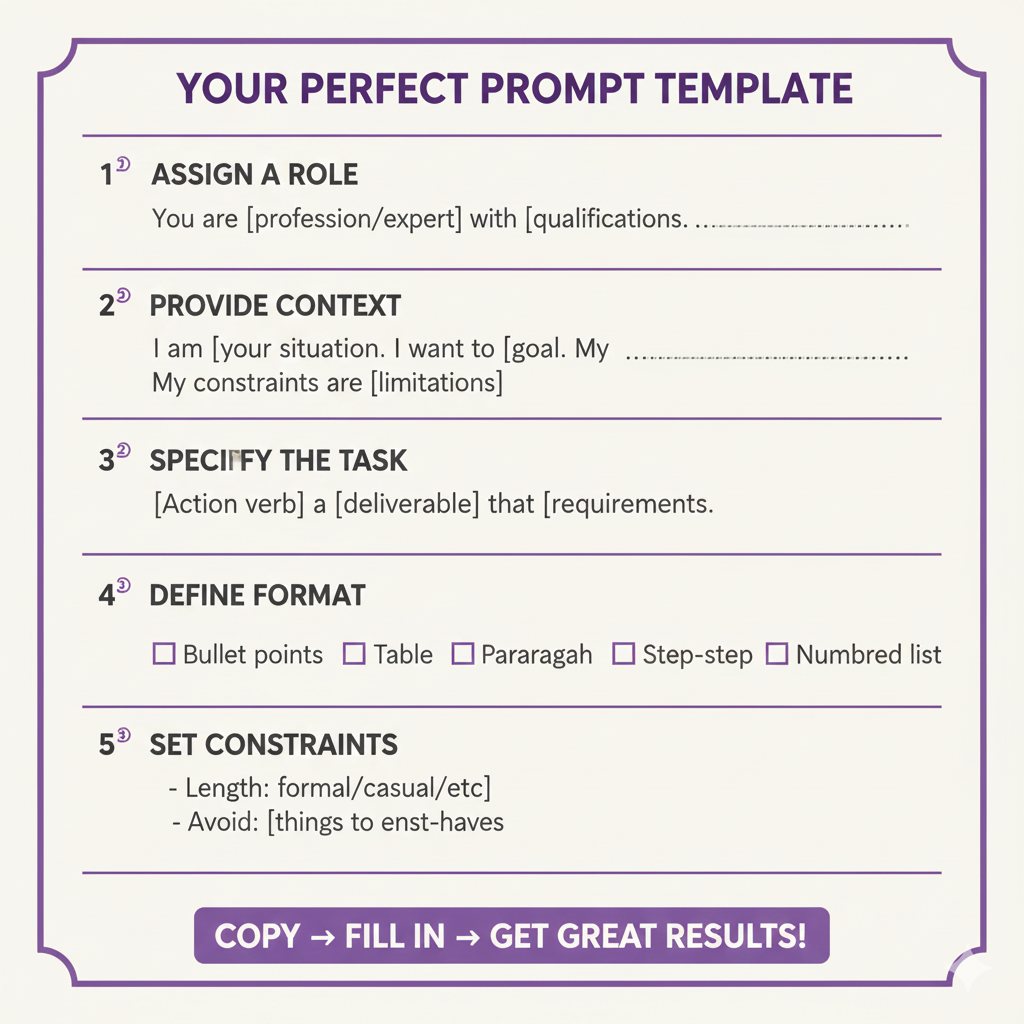
1. Role (Who should the AI be?)
Assigning a role helps AI adopt an appropriate perspective and expertise level.
Without role:
Tell me about investing.With role:
You are a financial advisor with 20 years of experience. Explain investing to a complete beginner.Common roles to use:
- Expert in [field]
- Teacher for [grade level]
- Professional [job title]
- Consultant specializing in [specialty]
- Experienced [profession]
2. Context (What background information is relevant?)
Context helps AI understand the situation and tailor responses appropriately.
Without context:
Write a product description for a water bottle.With context:
I'm launching a premium insulated water bottle targeted at outdoor enthusiasts and hikers. It keeps drinks cold for 48 hours and hot for 24 hours. Price point is $45, competing with Hydro Flask and YETI.Write a product description for my e-commerce website.Context includes:
- Your audience
- Your goal
- Background information
- Constraints or requirements
- Relevant details
3. Task (What exactly do you want?)
Be specific about the action you want AI to perform.
Vague task:
Help me with my resume.Specific task:
Review my resume and suggest 5 specific improvements to make it more compelling for software engineering positions at tech startups.Use action verbs:
- Analyze, evaluate, assess
- Create, generate, design
- Summarize, condense, extract
- Explain, clarify, teach
- Compare, contrast, differentiate
- Improve, optimize, enhance
- List, enumerate, outline
4. Format (How should the output look?)
Specify the exact format you want to avoid back-and-forth.
Without format:
Give me marketing strategies for my coffee shop.With format:
Give me 5 marketing strategies for my coffee shop. For each strategy, provide:- Strategy name- Implementation steps (3-5 bullets)- Estimated cost- Expected timeframe- Potential ROIFormat as a table.Common formats:
- Bullet points
- Numbered list
- Table
- Paragraph form
- Outline
- Step-by-step guide
- JSON/code
- Email/letter format
5. Constraints (What are the limitations?)
Specify any requirements, limitations, or things to avoid.
Without constraints:
Write a blog post about AI.With constraints:
Write a 500-word blog post about AI for a general audience. Use simple language (8th-grade reading level). Avoid technical jargon. Include 2-3 concrete examples. Write in a friendly, conversational tone.Common constraints:
- Length (words, characters, paragraphs)
- Tone (formal, casual, friendly, professional)
- Reading level
- Things to avoid
- Required elements
- Style preferences
Complete Example
Let’s see all components together:
[ROLE] You are a professional email copywriter.[CONTEXT] I need to send a follow-up email to a potential client I met at a networking event last week. We discussed their need for social media marketing services. They seemed interested but haven't responded to my initial thank-you email from 3 days ago.[TASK] Write a follow-up email that gently reminds them of our conversation and offers value without being pushy.[FORMAT] Keep it under 150 words. Include a subject line.[CONSTRAINTS] Maintain a friendly but professional tone. Include a clear call-to-action. Don't sound desperate or sales-y.This comprehensive prompt will generate much better results than “Write a follow-up email.”
10 Essential Prompting Techniques
Master these 10 techniques and you’ll be in the top 10% of AI users.
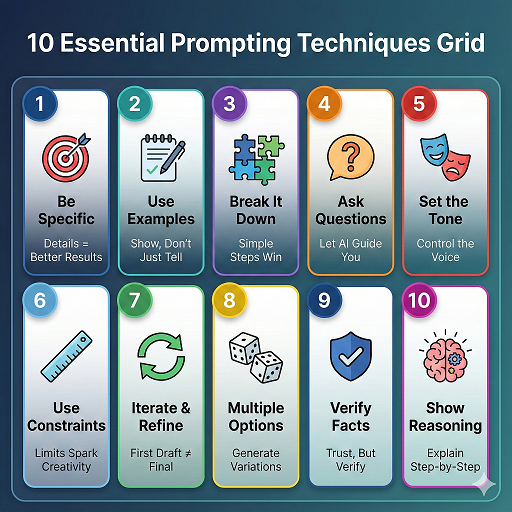
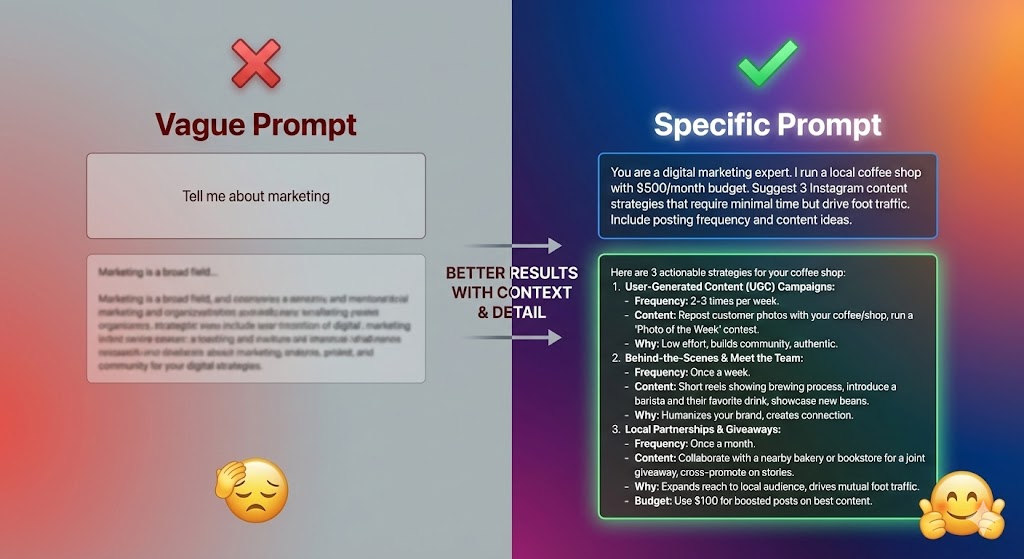
Technique 1: Be Specific and Detailed
The Rule: Vague prompts get vague results. Specific prompts get specific results.
Bad example:
Tell me about exercise.Good example:
I'm a 35-year-old beginner who wants to lose 20 pounds and improve cardiovascular health. I have 30 minutes available 4 days per week and access to a basic home gym (dumbbells, resistance bands, yoga mat). I have mild knee issues, so high-impact activities are difficult.Create a 4-week progressive workout plan that accommodates these constraints. For each workout, specify exercises, sets, reps, and rest periods.Why it works: AI has all the information needed to create a personalized, useful response.
When to use: Always. More detail is almost always better.
Technique 2: Use Examples (Few-Shot Prompting)
The Rule: Show AI what you want by providing examples.
Without examples:
Write product taglines for a coffee brand.With examples:
Write product taglines for a coffee brand.Examples of the style I like:- Nike: "Just Do It"- Apple: "Think Different" - MasterCard: "There are some things money can't buy"Create 5 taglines in this style—short, memorable, and emotionally resonant.Why it works: Examples clarify your expectations better than explanations.
When to use: When you want a specific style, format, or approach that’s easier to show than describe.
Technique 3: Break Complex Tasks into Steps
The Rule: AI handles simple tasks better than complex multi-step tasks. Break big requests into smaller pieces.
Complex (harder for AI):
Create a complete marketing strategy for my new app, including target audience analysis, positioning, messaging, channel recommendations, content calendar, and budget allocation.Broken down (easier for AI):
Step 1: Help me identify my target audience for a fitness tracking app aimed at busy professionals. What demographics and psychographics should I consider?[Get response, then...]Step 2: Based on this target audience [paste audience from step 1], what positioning would differentiate my app in a crowded market?[Continue through each component...]Why it works: Allows you to review and refine each component before moving forward.
When to use: For complex projects, multi-stage tasks, or when you need to make decisions between steps.
Technique 4: Ask AI to Ask You Questions
The Rule: If you’re not sure what information to provide, let AI gather it.
Traditional approach:
Help me plan a vacation.Better approach:
I want to plan a vacation but I'm not sure what details you need. Ask me 10 questions that will help you give me the best recommendations. Ask one question at a time so I can answer thoroughly.Why it works: AI identifies what it needs to know to help you effectively.
When to use: When starting a new project, exploring options, or working in unfamiliar domains.
Technique 5: Specify Tone and Style
The Rule: AI can write in virtually any style—just tell it what you want.
Default (no style specified):
Explain quantum computing.Result: Likely dry, technical explanation
With style:
Explain quantum computing as if you're a friendly teacher talking to a curious 12-year-old. Use simple analogies and keep it fun and engaging.Result: Accessible, entertaining explanation with great analogies
Tone options:
- Professional / Formal / Academic
- Casual / Conversational / Friendly
- Humorous / Witty / Sarcastic
- Inspiring / Motivational
- Direct / Concise / No-nonsense
- Empathetic / Supportive
- Enthusiastic / Excited
Style options:
- Hemingway (short sentences, simple words)
- Academic (formal, well-cited)
- Journalistic (inverted pyramid, factual)
- Storytelling (narrative arc)
- Technical (precise, detailed)
When to use: For any writing task where tone matters—emails, content, presentations, messages.
Technique 6: Use Constraints to Improve Quality
The Rule: Constraints force AI to be more creative and purposeful.
Without constraints:
Write about the benefits of meditation.With constraints:
Write about the benefits of meditation in exactly 100 words. Every sentence must start with a different letter of the alphabet (A, B, C...). Make it compelling and scientifically accurate.Why it works: Constraints force AI to think harder and avoid generic outputs.
Useful constraints:
- Word/character limits
- Avoid certain words or phrases
- Use a specific vocabulary level
- Include specific elements
- Follow a pattern or structure
- Use only [number] sentences
When to use: When generic results aren’t good enough and you want more creative or refined outputs.
Technique 7: Iterative Refinement
The Rule: First attempt rarely produces perfection. Refine through conversation.
Initial prompt:
Write a LinkedIn post about work-life balance.Refinement conversation:
[AI generates post]You: Make it more personal and vulnerable. Share a specific struggle.[AI revises]You: Good, but shorten to 150 words and add a question at the end to encourage engagement.[AI revises again]You: Perfect. Now suggest 5 variations of the opening sentence.Why it works: Iterative refinement reaches better results than trying to write the perfect prompt initially.
When to use: For important content, creative work, or when you’re not quite sure what you want until you see it.
Technique 8: Request Multiple Options
The Rule: AI can generate variations quickly—use this to explore possibilities.
Single output:
Suggest a name for my dog training business.Multiple options:
Generate 20 creative names for my dog training business. Provide a mix of:- 5 descriptive/straightforward names- 5 playful/fun names- 5 professional/premium names- 5 completely unexpected/creative namesFor each, provide a one-sentence explanation of the concept.Why it works: More options = better chance of finding something great. Also helps identify what resonates with you.
When to use: For creative decisions, brainstorming, naming, design concepts, and strategies.
Technique 9: Verify and Fact-Check
The Rule: AI can hallucinate (make up plausible-sounding but false information). Always verify important facts.
Risky approach:
[Ask AI for facts, accept them as true without verification]Safe approach:
Give me 5 statistics about climate change impact on agriculture. For each statistic, provide the source, year of publication, and methodology if available.Then separately, note which claims need verification and which are well-established facts.Verification strategies:
- Ask AI to cite sources (but verify those sources exist)
- Cross-reference with multiple sources
- Ask AI to express confidence level
- Use web-connected AI features when available
- Be extra cautious with recent events, statistics, and specific claims
When to use: For any factual information that matters—research, professional work, decision-making.
Technique 10: Chain of Thought Prompting
The Rule: Ask AI to explain its reasoning step-by-step for better accuracy and transparency.
Without reasoning:
Should I invest in real estate or stocks?Result: Direct answer without explanation
With a chain of thought:
I'm trying to decide whether to invest in real estate or stocks. Think through this step by step:1. First, analyze my situation [30 years old, $50K saved, moderate risk tolerance, goal is retirement in 30 years]2. Then, list pros and cons of each investment type3. Consider my specific circumstances4. Explain your reasoning process5. Finally, provide a recommendation with rationaleShow your work at each step.Why it works: Explicit reasoning reduces errors, helps you understand the logic, and produces more thoughtful responses.
When to use: For decisions, complex problems, mathematical calculations, analysis, or when you need to understand the “why” behind an answer.
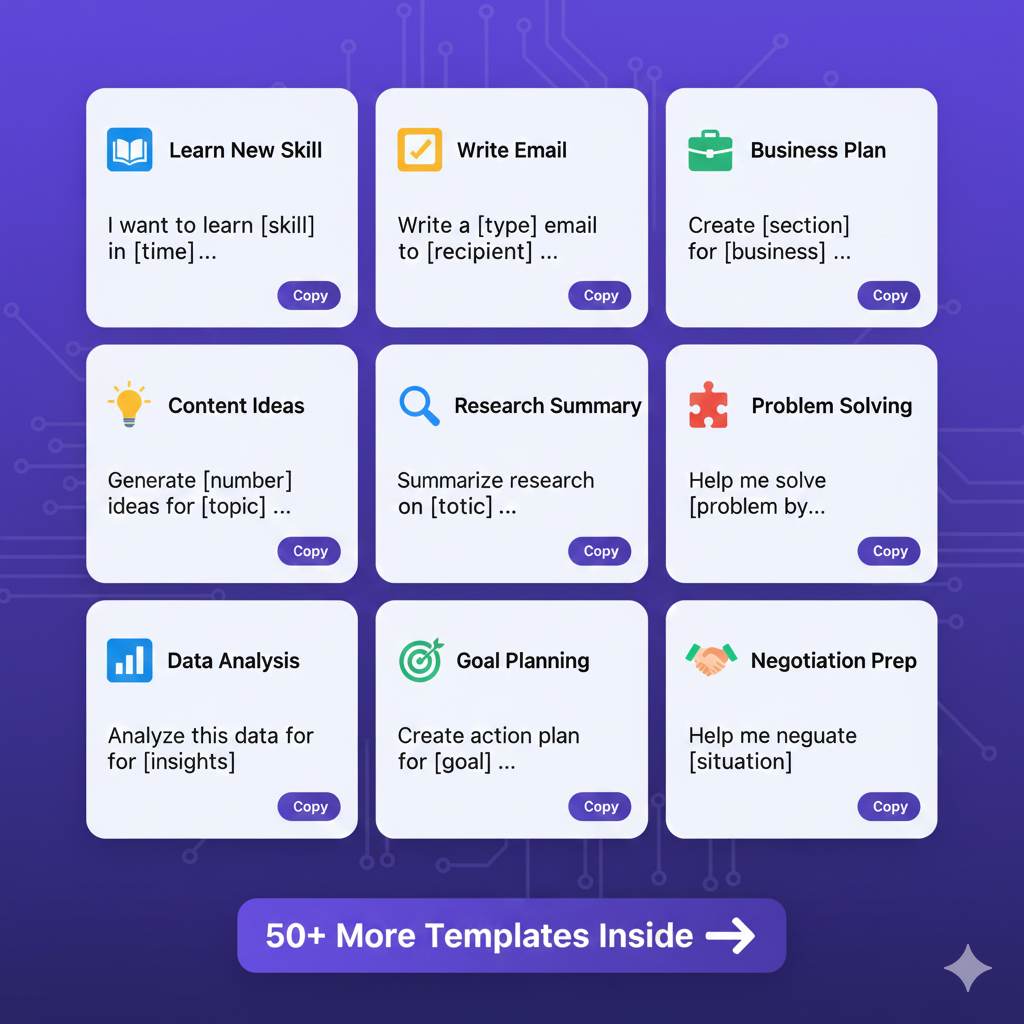
50+ Prompt Templates You Can Copy
Copy these templates and fill in the brackets with your specific information.
For Learning & Education
1. Explain Complex Concepts
Explain [concept] to me as if I'm [age/background]. Use [number] analogies that relate to [familiar domain]. Then give me 3 practice questions to test my understanding.2. Learn a New Skill
I want to learn [skill] in [timeframe]. I currently have [experience level] and can dedicate [hours per week]. Create a learning roadmap with specific resources, milestones, and practice exercises.3. Understand Difficult Material
I'm struggling to understand [concept] from [source]. Here's what I don't understand: [specific confusion]. Explain it differently using simple language and examples.4. Study Guide Creation
Create a comprehensive study guide for [topic]. Include:- Key concepts with definitions- Important relationships between concepts- Common misconceptions- Practice questions (easy, medium, hard)- Memory aids/mnemonics5. Language Learning
I'm learning [language] at [level]. Create 20 common conversational phrases for [situation] with pronunciation guides and cultural context notes. Include example dialogues.For Writing & Content
6. Blog Post Outline
Create a detailed outline for a blog post titled "[title]" targeting [audience]. Include:- Attention-grabbing introduction hook- 5-7 main sections with 2-3 subpoints each- Data/statistics to include- Conclusion with call-to-actionTarget length: [words]7. Email Writing
Write a [type] email to [recipient] about [topic]. Tone should be [formal/casual/friendly]. Include [specific elements]. Keep under [word count]. Subject line should [criteria].8. Social Media Content
Create [number] [platform] posts about [topic] for [audience]. Each should:- Be [length] long- Include relevant hashtags- Have a hook in the first line- End with engagement questionTone: [describe]9. Rewrite for Different Audiences
Rewrite this text for [different audience]:[paste text]Original audience: [describe]New audience: [describe]Adjust: [tone/complexity/length/focus]10. Content Improvement
Improve this [type of content]:[paste content]Make it more:- [quality 1]- [quality 2]- [quality 3]Maintain the same [length/structure/tone].For Business & Work
11. Meeting Preparation
I have a meeting with [person/group] about [topic]. Help me prepare by:1. Listing key points I should address2. Anticipating their concerns/questions3. Suggesting persuasive arguments4. Creating a structured agenda5. Identifying potential objections and responses12. Executive Summary
Create an executive summary of this [document/proposal]:[paste content or describe]Target audience: [decision makers]Focus on: [key priorities]Length: [number] pagesInclude: recommendations, risks, next steps13. Business Plan Section
Write the [section] of a business plan for [business idea]. Include [specific elements]. Target audience is [investors/banks/partners]. Make it [professional/compelling/data-driven]. Length: [words].14. Professional Bio
Write a professional bio for [purpose] highlighting:- [number] years of experience in [field]- Key achievements: [list]- Current role: [position]- Unique value: [what sets you apart]Length: [word count]Tone: [professional/approachable/authoritative]15. Presentation Outline
Create an outline for a [length] presentation on [topic] for [audience]. Structure should:- Open with [engaging element]- Cover [main points]- Include [visual suggestions]- End with [call-to-action]Goal: [what you want audience to do/think/feel]For Problem-Solving & Analysis
16. Decision Framework
I need to decide between [option A] and [option B] for [purpose]. Help me by:1. Listing criteria for comparison2. Weighing pros and cons3. Considering short-term vs long-term implications4. Identifying risks for each5. Recommending an approach based on [your priorities]17. Root Cause Analysis
I'm experiencing [problem]. Help me identify the root cause by:1. Asking clarifying questions about the problem2. Exploring potential contributing factors3. Using the "5 Whys" technique4. Identifying patterns5. Suggesting likely root causes6. Recommending solutions18. Brainstorming Session
I need [number] creative ideas for [problem/goal]. For each idea:- Explain the concept- List pros and cons- Rate feasibility (1-10)- Estimate resources needed- Suggest first stepsThink outside the box. No idea is too unconventional.19. Competitive Analysis
Compare [your product/service] against [competitors] in terms of:- Features/offerings- Pricing strategy- Target market- Strengths/weaknesses- Market positioning- Differentiation opportunitiesPresent as a comparison table.20. Process Optimization
Analyze this process and suggest improvements:Current process: [describe steps]Pain points: [list issues]Goals: [what you want to achieve]Provide:1. Identified inefficiencies2. Recommended changes3. Expected impact4. Implementation difficulty5. Prioritized action planFor Creative Work
21. Story Ideas
Generate [number] story ideas for [genre] that involve [elements]. For each:- One-sentence premise- Main conflict- Unique twist- Potential ending directionTarget audience: [describe]22. Character Development
Create a detailed character profile for [type of character] in [setting/story]. Include:- Background and history- Personality traits and quirks- Goals and motivations- Fears and weaknesses- Character arc potential- Distinctive voice/manner of speaking23. Marketing Campaign Concepts
Develop [number] creative concepts for marketing [product] to [target audience]. For each concept:- Big idea/theme- Key message- Visual direction- Channel recommendations- Example tagline- Why it would resonate with audience24. Product Naming
Generate [number] names for [product] that:- Convey [key benefit/feeling]- Are memorable and unique- Work for [target market]- Are likely available as domain names- Could work internationallyProvide rationale for each name.25. Design Concepts
Describe [number] design concepts for [project] that reflect [brand values/aesthetics]. For each:- Overall visual direction- Color palette recommendations- Typography suggestions- Imagery style- Mood/feeling- Why it works for [audience]For Coding & Technical
26. Code Generation
Write [language] code that [functionality]. Requirements:- [specific requirement 1]- [specific requirement 2]- [specific requirement 3]Include:- Inline comments explaining logic- Error handling- Example usage- Any dependencies needed27. Code Review
Review this code for:- Bugs and potential errors- Performance issues- Security vulnerabilities- Best practice violations- Readability improvements[paste code]Provide specific suggestions with corrected code examples.28. Technical Documentation
Create documentation for [function/API/feature] that includes:- Overview and purpose- Parameters/arguments (type, description, required/optional)- Return values- Example usage (3 common scenarios)- Error cases- Notes/warningsAudience: [junior/senior developers]29. Algorithm Explanation
Explain [algorithm] step by step:1. What problem it solves2. How it works (plain English)3. Time/space complexity4. When to use vs alternatives5. Simple code example6. Real-world applicationAssume I have [level] programming knowledge.30. Debugging Assistant
I'm getting this error: [error message]Context:- Language/framework: [specify]- What I'm trying to do: [describe]- Code snippet: [paste relevant code]- What I've already tried: [list attempts]Help me:1. Understand what's causing the error2. Fix it with corrected code3. Prevent similar errors in the futureFor Personal Productivity
31. Daily Schedule Optimization
Optimize my schedule based on these commitments:[list commitments with times]Priorities: [list in order]Energy patterns: [when you're most productive]Must-dos: [non-negotiable items]Goals: [what you want to achieve]Create an optimized schedule with:- Time blocks for focus work- Buffers between meetings- Energy management- Breaks and downtime32. Goal Setting & Planning
Help me create an action plan for achieving [goal] in [timeframe].Current situation: [describe]Resources available: [list]Constraints: [list]Provide:1. Milestone breakdown2. Weekly action items3. Success metrics4. Potential obstacles and solutions5. Accountability system33. Email Management
I have [number] unread emails. Help me triage by:1. Suggesting categories for sorting2. Creating rules for auto-organization3. Drafting template responses for common types4. Identifying what can be delegated/deleted5. Setting up a system to prevent future overload34. Meeting Notes Summary
Summarize these meeting notes into:- Key decisions made- Action items (who, what, by when)- Important discussion points- Follow-up needed- Next meeting agenda items[paste notes]Format as bulleted lists for easy reference.35. Habit Formation Plan
I want to build the habit of [habit]. Help me create a plan:- Current situation: [describe]- Obstacles: [list barriers]- Timeframe: [goal timeline]- Support system: [available resources]Provide:1. Starting point (minimum viable habit)2. Progressive difficulty levels3. Tracking system4. Triggers and cues5. Reward structure6. Obstacle management strategiesFor Research & Analysis
36. Literature Review
Create a structured review of research on [topic]. Include:- Key findings and themes- Methodologies used- Conflicting viewpoints- Gaps in current research- Evolution of understanding over time- Strongest evidence for/against [claim]Based on: [list sources if you have them, or ask AI to suggest]37. Data Interpretation
Help me interpret this data:[paste data or describe dataset]Analyze for:- Key patterns and trends- Outliers and anomalies- Correlations- Actionable insights- Visualizations that would be helpful- Conclusions and recommendations38. Survey Design
Design a survey to [objective] for [target audience]. Include:- [number] questions- Mix of question types (multiple choice, scale, open-ended)- Logical flow- Demographic questions- Avoid leading or biased questionsGoal: [what you want to learn]Length: [time to complete]39. Market Research Summary
Summarize market research findings for [industry/product]:- Market size and growth- Key players and market share- Customer segments- Trends and opportunities- Threats and challenges- Recommended strategySources: [list if you have them]40. SWOT Analysis
Create a SWOT analysis for [company/product/idea]:Context: [provide background]Analyze:- Strengths (internal advantages)- Weaknesses (internal limitations)- Opportunities (external possibilities)- Threats (external challenges)For each, provide 5-7 specific items with explanation.Bonus Templates
41. Recipe Creation
Create a recipe for [dish] that:- Serves [number]- Takes under [time]- Uses [dietary restrictions]- Requires [skill level]- Uses these ingredients I have: [list]Include: ingredients with amounts, step-by-step instructions, cook/prep times, tips for success, variations.42. Travel Itinerary
Plan a [duration] trip to [destination] for [travelers]. Preferences:- Budget: [range]- Interests: [list]- Must-sees: [list]- Pace: [relaxed/moderate/packed]- Accommodation preferences: [describe]Create day-by-day itinerary with activities, restaurants, logistics, and backup plans.43. Gift Recommendations
Suggest [number] gift ideas for [recipient] who:- Is [age] years old- Interests: [list hobbies/passions]- Budget: [range]- Occasion: [birthday/holiday/etc]- Already has: [list what not to suggest]For each gift: why it's perfect, where to buy, price range.44. Resume Bullet Points
Transform these job responsibilities into compelling resume bullet points using the STAR method:[paste responsibilities or describe role]Make them:- Action-oriented (strong verbs)- Quantified (numbers/percentages where possible)- Achievement-focused (impact, not just tasks)- ATS-friendly (include relevant keywords)Target role: [job title]45. Negotiation Preparation
Help me prepare to negotiate [salary/contract/deal]. Situation: [describe]What I want: [desired outcome]Their likely position: [what you expect]My leverage: [strengths]My constraints: [limitations]Provide:1. Opening position2. Walk-away point3. Concessions I can offer4. Responses to common objections5. Questions to ask them6. Negotiation tactics to use46. Conversation Starter
I'm attending [event] and will meet [type of people]. Create [number] conversation starters that:- Are natural and not forced- Lead to meaningful discussion- Work for [introverts/extroverts]- Avoid controversial topics- Help me stand out as [interesting/professional/friendly]47. Apology Message
I need to apologize for [situation]. Help me craft a message that:- Takes full responsibility (no "but" or excuses)- Acknowledges specific impact- Expresses genuine remorse- Offers concrete solution/compensation- Requests forgiveness appropriatelyRecipient: [describe relationship]Channel: [email/text/in-person]Tone: [sincere/professional/personal]48. Feedback Delivery
Help me give constructive feedback to [person] about [issue].Context: [relationship, situation]Goal: [behavior change, improvement, etc]Their personality: [describe]Create feedback using:1. Situation-Behavior-Impact framework2. Specific examples3. Actionable suggestions4. Supportive tone5. Clear next steps49. Speech/Toast Writing
Write a [length] [speech/toast] for [occasion] that:- Honors [person/people]- Includes [specific elements to mention]- Tone: [heartfelt/humorous/professional/etc]- Audience: [describe]- Opens with [type of hook]- Closes with [type of ending]Include delivery notes (pauses, emphasis).50. Difficult Conversation Script
Help me script a difficult conversation about [topic] with [person].Objective: [what you want to achieve]Challenges: [what makes this hard]Their perspective: [what they might think/feel]Ideal outcome: [best case scenario]Provide:1. Opening statement2. Key points to make3. How to handle resistance/emotions4. Compromise options5. Closing statementsCommon Prompting Mistakes to Avoid
Learn from these frequent errors that beginners make.
Mistake 1: Being Too Vague
Problem:
Help me with my business.Why it fails: AI doesn’t know what kind of help, what kind of business, what challenges you’re facing, or what success looks like.
Fix: Provide specifics about your situation, goals, and constraints.
Mistake 2: Asking Multiple Unrelated Questions at Once
Problem:
What's the best programming language to learn, how do I lose weight, and what should I invest in?Why it fails: AI will try to answer all three but won’t go deep on any. Results will be superficial.
Fix: Ask one focused question at a time. Go deep before moving to the next topic.
Mistake 3: Assuming AI Knows Your Context
Problem:
Continue where we left off.(After starting a new conversation)
Why it fails: Each conversation with AI starts fresh. It doesn’t remember previous chats unless you’re in the same conversation thread.
Fix: Always provide necessary context, even if you’ve discussed it before in a different conversation.
Mistake 4: Accepting First Output Without Refinement
Problem: Using AI’s first response without asking for improvements or variations.
Why it fails: First attempts are rarely perfect. AI excels at iteration.
Fix: Treat the first output as a draft. Ask for improvements, alternatives, or adjustments.
Mistake 5: Not Verifying Facts
Problem: Treating everything AI says as absolute truth.
Why it fails: AI can confidently generate incorrect information (hallucinations).
Fix: Verify important facts, statistics, and claims. Cross-reference with reliable sources.
Mistake 6: Copying AI Output Directly Without Review
Problem: Using AI-generated content verbatim without checking for:
- Accuracy
- Appropriateness
- Your personal voice
- Specific requirements
- Potential bias or problematic content
Why it fails: AI output often needs human refinement to be truly excellent.
Fix: Always review, edit, and personalize AI-generated content. Add your unique perspective and expertise.
Mistake 7: Using Overly Complex Prompts
Problem:
[3 paragraphs of context] + [10 requirements] + [5 constraints] + [7 examples] + [complex formatting requirements]Why it fails: Too much information can confuse AI or cause it to focus on wrong elements.
Fix: Start simple, then add complexity through iteration. Break massive prompts into conversational steps.
Mistake 8: Ignoring Tone and Voice
Problem: Not specifying how you want something written.
Why it fails: AI defaults to a generic, somewhat formal tone that might not fit your needs.
Fix: Always specify tone, style, and voice—especially for customer-facing content.
Mistake 9: Not Experimenting with Different Approaches
Problem: Using the same prompt structure for everything.
Why it fails: Different tasks benefit from different prompting techniques.
Fix: Try multiple approaches: direct questions, role-playing, examples, constraints, step-by-step, etc.
Mistake 10: Giving Up Too Quickly
Problem: Asking once, getting mediocre results, and concluding “AI doesn’t work for this.”
Why it fails: Effective prompting often requires 2-5 iterations to get great results.
Fix: Treat prompting as a conversation. Refine, clarify, and iterate until you get what you need.
Advanced Tips for Better Results
Once you’ve mastered the basics, these advanced techniques will elevate your prompting game.
Tip 1: Use Delimiters for Clarity
When including multiple sections in a prompt, use clear delimiters:
Context: [your context]---Task: [what you want done]---Format: [how you want output]---Constraints: [limitations]Or use XML-style tags:
<context>[Your context here]</context><task>[Your task here]</task>Why it works: Helps AI parse different sections of your prompt accurately.
Tip 2: Specify What NOT to Do
Sometimes it’s easier to specify what you don’t want:
Write a product description that does NOT:- Use superlatives ("best," "greatest," "amazing")- Make unverifiable claims- Sound like typical marketing hype- Exceed 100 wordsInstead: Focus on concrete features and realistic benefits.Why it works: Negative constraints guide AI away from common bad patterns.
Tip 3: Request Reasoning and Sources
For factual content, ask AI to show its work:
Explain [topic]. For each claim you make:1. Provide the reasoning2. Cite sources where applicable3. Indicate confidence level (high/medium/low)4. Note any caveats or exceptionsWhy it works: Increases accuracy and helps you evaluate reliability of information.
Tip 4: Use Temperature Control (If Available)
Some AI platforms let you adjust “temperature” (creativity vs. consistency):
- Low temperature (0.0-0.3): More focused, consistent, factual
- Best for: Technical writing, data analysis, code
- Medium temperature (0.4-0.7): Balanced
- Best for: General writing, explanations
- High temperature (0.8-1.0): More creative, varied
- Best for: Creative writing, brainstorming, ideation
Why it works: Matches AI behavior to your specific needs.
Tip 5: Create Prompt Libraries
Save your best prompts in a document or note-taking app. Organize by:
- Purpose (writing, analysis, learning, etc.)
- Result quality (5-star system)
- Frequency of use
- Context needed
Why it works: Builds on success, saves time, and creates a valuable personal resource.
Tip 6: Combine Multiple Techniques
The most powerful prompts often combine several techniques:
[ROLE] You are an experienced teacher.[CONTEXT + EXAMPLES] I'm learning about photosynthesis. I understand that plants use sunlight, but I'm confused about how this relates to cellular respiration.[TASK + CHAIN OF THOUGHT] Explain the relationship step-by-step, showing how the two processes connect.[FORMAT] Use a simple diagram described in text, followed by explanation in bullet points.[CONSTRAINTS] Use 8th-grade vocabulary. Avoid jargon unless you define it.Why it works: Multiple techniques compound their effectiveness.
Tip 7: Use AI to Improve Your Prompts
Meta-prompting: Ask AI to help you write better prompts.
I want to ask AI for [what you want]. Help me write a better prompt by suggesting:1. What information to include2. How to structure it3. What techniques would work best4. A complete example promptWhy it works: AI can help you learn prompting faster.
Tip 8: Maintain Conversation Context
In longer conversations, periodically summarize to maintain context:
Before we continue, let's recap:- Goal: [what we're trying to achieve]- Progress so far: [what we've done]- Next step: [what comes next]Now, let's [continue with next task].Why it works: Prevents AI from losing track of the overall objective in long conversations.
Tip 9: Use Conditional Logic
Create IF-THEN prompts for complex scenarios:
Analyze this business idea: [describe idea]IF the market is saturated, suggest differentiation strategies.IF the concept is novel, identify potential risks.IF capital requirements are high, provide bootstrapping alternatives.For each scenario, provide specific recommendations.Why it works: Handles multiple possible situations elegantly.
Tip 10: Leverage AI’s Multilingual Abilities
Even if you speak one language, AI can:
- Translate nuanced content
- Adapt messaging for different cultures
- Explain cultural context
- Provide international perspectives
I'm writing marketing copy for [product] in English. How would this message be perceived in [country/culture]? Are there any cultural sensitivities I should be aware of? Suggest adaptations that would resonate better locally.Why it works: Global perspective enhances your work.
Practice Exercises
The best way to learn prompting is practice. Try these exercises:
Exercise 1: Prompt Rewriting (Beginner)
Take this vague prompt and make it specific:
Tell me about healthy eating.Your improved prompt:
[Write your version here]Example solution:
I'm a 35-year-old office worker trying to lose 15 pounds. I have a sedentary job and often skip breakfast. Explain 5 healthy eating habits I can implement immediately, with specific meal examples and prep tips for someone with limited cooking time. Focus on sustainable changes, not extreme diets.Exercise 2: Multi-Step Problem (Intermediate)
Break this complex task into 3-5 prompts:
Help me plan and execute a successful product launch for my new app.Your step-by-step approach:
- [First prompt]
- [Second prompt]
- [Third prompt] …
Exercise 3: Tone Shifting (Intermediate)
Take this sentence and create 5 prompts asking AI to rewrite it in different tones:
Original: “We are experiencing technical difficulties with our service.”
Create prompts for:
- Apologetic and empathetic
- Professional and formal
- Casual and friendly
- Humorous
- Urgent and action-oriented
Exercise 4: Template Creation (Advanced)
Create a reusable prompt template for a task you do regularly at work.
Include:
- Role assignment
- Context variables [in brackets]
- Clear task description
- Desired format
- Relevant constraints
Exercise 5: Iterative Refinement (Advanced)
Start with this simple prompt:
Write a LinkedIn post about AI.Through 5 iterations, refine it to produce exceptional output. Document each refinement and what improved.
Tools and Resources
AI Platforms to Practice With
Free Options:
- ChatGPT (OpenAI) – Most popular, great for general use
- Claude (Anthropic) – Excellent for writing and analysis
- Google Gemini – Strong at research and multimodal tasks
- Microsoft Copilot – Integrated with Microsoft products
- Perplexity AI – Best for research with citations
Paid Options (Worth considering):
- ChatGPT Plus ($20/month) – GPT-4 access, plugins, faster responses
- Claude Pro ($20/month) – More usage, longer conversations
- Gemini Advanced ($19.99/month) – Advanced capabilities
Learning Resources
Free Courses:
- Learn Prompting (learnprompting.org)
- PromptingGuide.ai
- OpenAI Cookbook (GitHub)
- Anthropic Prompt Library
Books:
- “The Art of Prompt Engineering” by various authors
- “Prompt Engineering for Developers” (O’Reilly)
Communities:
- r/ChatGPT (Reddit)
- r/ClaudeAI (Reddit)
- AI Discord servers
- LinkedIn groups focused on AI
Prompt Libraries
- Awesome ChatGPT Prompts (GitHub)
- FlowGPT – Community-shared prompts
- PromptBase – Marketplace for prompts
- AIPRM – Chrome extension with prompt templates
Tools for Power Users
- Prompt Perfect – Automatically improves your prompts
- PromptLayer – Track and manage prompts
- LangChain – Framework for chaining AI operations (technical)
FAQ: Your Prompting Questions Answered
How long should my prompts be?
Short answer: As long as necessary to be clear, but no longer.
Detailed answer:
- Simple tasks: 1-3 sentences often sufficient
- Complex tasks: 100-300 words with full context
- Very complex: Break into multiple prompts
There’s no hard limit, but extremely long prompts (500+ words) often work better when broken into conversational steps.
Can AI remember previous conversations?
Short answer: Yes, within a single conversation thread. No, across different conversations.
Detailed answer:
- AI maintains context within one chat session
- Starting a new conversation = fresh start, no memory
- Some platforms offer “memory” features (experimental)
- Always provide necessary context in each conversation
How do I know if AI is giving me accurate information?
Short answer: Always verify important facts. Use multiple sources.
Detailed answer:
- Ask AI to cite sources (but verify those sources exist)
- Cross-reference with authoritative sources
- Be extra cautious with: statistics, recent events, medical/legal advice
- Use web-connected AI features when available
- Ask AI to indicate confidence level
- When in doubt, verify independently
Trust but verify.
What if I don’t get good results?
Short answer: Refine your prompt. It’s usually a prompting issue, not an AI limitation.
Try this:
- Make prompt more specific
- Add more context
- Show examples of what you want
- Try different wording
- Break task into smaller pieces
- Ask AI what information it needs
Most “AI can’t do this” problems are actually “I haven’t prompted this correctly yet” problems.
Is it cheating to use AI for work/school?
Short answer: Depends on the context and how you use it.
Detailed answer:
- Acceptable: Using AI as a tool (like a calculator, spell-checker, research assistant)
- Gray area: Heavy reliance without understanding/editing
- Not acceptable: Passing off AI work as your own without disclosure
- Always: Check your institution/company policies
- Best practice: Use AI to enhance your work, not replace your thinking
Think of AI as a powerful tool, not a substitute for learning and expertise.
Can I make money with prompting skills?
Short answer: Yes, increasingly so.
Ways to monetize:
- Freelance prompt engineering ($50-150/hour)
- Create and sell prompt templates
- Offer AI consulting services
- Content creation services using AI
- Teaching prompting skills
- Build AI-powered products
Job market for prompt engineering skills is growing rapidly.
Do I need to learn technical skills or coding?
Short answer: No, not for basic to intermediate prompting.
Detailed answer:
- Basic prompting: No technical skills needed
- Advanced prompting: Helps to understand basic logic
- Professional prompt engineering: Some programming knowledge is beneficial
- Most users: Never need to touch code
Start with natural language prompting. Learn technical skills only if/when needed for your goals.
Which AI should I use?
Short answer: Try multiple, use what works best for your needs.
Quick comparison:
- ChatGPT: Best all-rounder, largest community
- Claude: Superior for writing, analysis, longer contexts
- Gemini: Strong for research, Google integration
- Copilot: Best if you use Microsoft products
Most people benefit from having accounts on 2-3 platforms and choosing based on the task.
How quickly can I become good at prompting?
Timeline:
- Week 1: Understand basics, see immediate improvement
- Month 1: Comfortable with common techniques
- Month 3: Proficient, able to handle most tasks well
- Month 6+: Advanced skills, high efficiency
Keys to faster learning:
- Practice daily
- Experiment deliberately
- Learn from others’ prompts
- Iterate on everything
Will prompting skills become obsolete?
Short answer: Unlikely anytime soon. They’ll evolve, not disappear.
Reasoning:
- As AI gets better, nuanced communication still matters
- More sophisticated AI = more sophisticated prompting opportunities
- Human judgment in crafting requests remains valuable
- Even “AI that writes its own prompts” needs human direction
Think of prompting like Google search skills—they evolved but remain essential.
Conclusion: Your Journey Begins Now
You’ve just learned the fundamentals of AI prompting—a skill that will serve you for years to come. But knowledge without practice is just theory.
Your Next Steps
This Week:
- Choose an AI platform and create an account (ChatGPT or Claude recommended)
- Try 5 prompts from the templates section
- Refine each prompt at least once based on results
- Document what worked and what didn’t
This Month:
- Use AI for at least one work/study task daily
- Build your personal prompt library
- Experiment with different prompting techniques
- Join an online community to learn from others
This Quarter:
- Develop expertise in prompting for your specific field
- Create custom prompt templates for your regular tasks
- Teach someone else what you’ve learned
- Measure your productivity improvements
The Compound Effect
Improving your prompting skills by just 1% per week compounds dramatically:
- Week 1: 1% better
- Week 10: 10% better
- Week 52: 52% better
- Year 2: 100%+ better
Small, consistent improvements yield extraordinary results.
Remember These Core Principles
- Be specific: Vague prompts get vague results
- Provide context: AI needs a background to help you effectively
- Iterate always: First attempts are drafts, not finals
- Verify facts: Trust but verify, especially for important information
- Experiment freely: There’s no “wrong” way to prompt—only learning opportunities
The Future is Collaborative
The future isn’t humans versus AI. It’s humans working with AI.
Those who master prompting will leverage AI to:
- Learn faster
- Work smarter
- Create better
- Think deeper
- Accomplish more
And it all starts with learning to communicate effectively with AI.
One Final Thought
Every expert at prompting started where you are right now—curious, uncertain, and just beginning. The difference between beginners and experts isn’t talent. It’s practice.
So stop reading and start prompting.
Open ChatGPT or Claude right now. Try your first prompt from this guide. See what happens. Refine it. Try again.
Your AI-augmented future begins with that first prompt.
Welcome to the world of AI prompting. You’re going to do amazing things.
Related Articles:
Chain of Thought Prompting: Advanced Guide
Generative AI and the Future of Work
Deep Research Process: Complete Guide
As long as necessary to be clear, but no longer. For simple tasks, 1-3 sentences are often sufficient. For complex tasks, 100-300 words with full context work well, and for very complex requests, break them into multiple prompts rather than creating a single extremely long prompt. There’s no hard limit, but prompts exceeding 500 words often work better when broken into conversational steps.
A: Yes, within a single conversation thread. No, across different conversations. AI maintains context within one chat session, allowing it to reference earlier parts of your conversation. However, starting a new conversation means a fresh start with no memory of previous chats. Some platforms offer experimental memory features, but as a general rule, always provide necessary context in each new conversation to ensure AI has the information it needs.
Always verify important facts using multiple sources. Ask AI to cite sources, but verify those sources actually exist. Cross-reference information with authoritative sources. Be extra cautious with statistics, recent events, and medical or legal advice. Use web-connected AI features when available. Ask AI to indicate its confidence level. When in doubt, verify independently. The key principle is trust but verify – treat AI as a helpful assistant whose work you review, not as an infallible authority.
A: Refine your prompt rather than giving up. Most poor results are prompting issues, not AI limitations. Try these steps: make your prompt more specific, add more context about your situation and goals, show examples of what you want, try different wording, break the task into smaller pieces, or ask AI what information it needs from you. Most “AI can’t do this” problems are actually “I haven’t prompted this correctly yet” problems. Iteration is key to getting excellent results.
A: It depends on the context and how you use it. Using AI as a tool, like a calculator, spell-checker, or research assistant, is generally acceptable. Heavy reliance without understanding or editing falls into a gray area. Passing off AI work as your own without disclosure is not acceptable. Always check your institution or company policies. Best practice is to use AI to enhance your work and boost productivity, not replace your thinking and learning. Think of AI as a powerful tool that amplifies your capabilities rather than a substitute for developing expertise.
A: Yes, increasingly so. You can monetize prompting skills in several ways: freelance prompt engineering ($50-150 per hour), creating and selling prompt templates, offering AI consulting services, providing content creation services using AI, teaching prompting skills through courses or coaching, or building AI-powered products. The job market for prompt engineering skills is growing rapidly as more companies recognize the value of AI expertise. Even if you don’t become a full-time prompt engineer, strong prompting skills make you more valuable in virtually any role.
A: No, not for basic to intermediate prompting. Basic prompting requires no technical skills – just the ability to communicate clearly in natural language. Advanced prompting benefits from understanding basic logic and structure. Professional prompt engineering roles may benefit from some programming knowledge, but most users never need to touch code. Start with natural language prompting and learn technical skills only if and when needed for your specific goals. The beauty of AI prompting is that it’s accessible to everyone, regardless of technical background.
A: Try multiple AI platforms and use what works best for your needs. ChatGPT is the best all-rounder with the largest community. Claude excels at writing, analysis, and handling longer contexts. Google Gemini is strong for research and Google integration. Microsoft Copilot works best if you use Microsoft products. Most people benefit from having accounts on 2-3 platforms and choosing based on the specific task. Each AI has strengths and weaknesses, so experimenting helps you discover which works best for your use cases.
A: You can see improvement within the first week and become proficient in 3-6 months. Here’s a typical timeline: Week 1 – understand basics and see immediate improvement in results. Month 1 – become comfortable with common techniques and patterns. Month 3 – achieve proficiency and handle most tasks well. In month 6 and beyond, develop advanced skills and high efficiency. Keys to faster learning include practicing daily, experimenting deliberately, learning from others’ prompts, and iterating on everything you create. Like any skill, consistent practice yields the best results.
A: Unlikely anytime soon. Prompting skills will evolve but not disappear. As AI gets better, nuanced communication still matters and becomes even more important. More sophisticated AI creates more sophisticated prompting opportunities. Human judgment in crafting requests remains valuable regardless of AI capabilities. Even AI that can write its own prompts needs human direction and goals. Think of prompting like Google search skills – they evolved over time but remain essential. The ability to communicate effectively with AI will be a fundamental skill for the foreseeable future.

Recent Comments